From screen to audio and back while walking
1Reality Labs Research, Meta · 2University of Toronto
Conference paper · UIST '25: ACM Symposium on User Interface Software and Technology, Busan, Republic of Korea

Quick facts
Looking down at a phone while walking splits your attention between the screen and the street. Viago lets you start browsing by looking, keep going by listening with the phone at your side, and pick up where you left off when you look again. The work was led by Ruei-Che Chang (University of Michigan) during a research internship at Reality Labs Research, Meta. Overall, our work contributes:
- Design insights and guidelines from a design probe study with ten users, for reducing cognitive load and supporting continuity and quick resumption when switching between visual and audio modalities on the go.
- Viago, a smartphone background service that provides multimodal feedback and interaction techniques for seamless transitions between visual and audio modalities.
- A preliminary evaluation with thirteen mobile users that shows the limitations, feasibility, and promise of Viago.
- Broader design implications for intelligent, seamless modality switching in on-the-go contexts.
Abstract
As mobile phone use while walking becomes increasingly prevalent, users often divide their visual attention between their surroundings and phone displays, raising concerns around safety and interaction efficiency. Alternative input and output modalities (such as eyes-free touch gestures and audio feedback) offer a promising avenue for reducing visual demands in these contexts. However, the design of seamless transitions between visual and audio modalities for mobile interaction on the go remains underexplored. To fill this gap, we conducted a design probe study with ten participants, simulating screen reader-like experiences across diverse applications to identify five key design insights and three design guidelines. Informed by these insights, we developed Viago, a background service that facilitates fluid transitions between visual and audio modalities for mobile task management while walking. A subsequent evaluation with thirteen participants demonstrated that Viago effectively supports on-the-go interactions by enabling users to interleave modalities as needed. We conclude by discussing the broader implications of visual-audio modality transitions and their potential to enhance mobile interactions in everyday, dynamic environments.
The idea: hand the feed from eyes to ears, and back
Screen readers already let blind and low-vision people use a phone through touch gestures and audio. Viago borrows that model for anyone on the move, and focuses on the two hand-offs that a screen reader does not handle: visual to audio (V2A) before you start walking, and audio to visual (A2V) when you look at the screen again.
Two design choices make this work. First, what you hear in audio mode is set up while you can still see: the same headline you hear while looking is where audio mode starts, and the orange outlines tell you exactly which elements you will be able to reach by ear. Second, high-visibility actions that you take by ear, such as sharing or reposting, are not sent right away. They wait until you look at the screen and confirm them.
System
We first ran a design probe study (see Studies below) and turned its five insights into three guidelines, one for each stage: the visual-to-audio transition, consuming content on the go, and the audio-to-visual transition. Viago implements one set of techniques per stage.
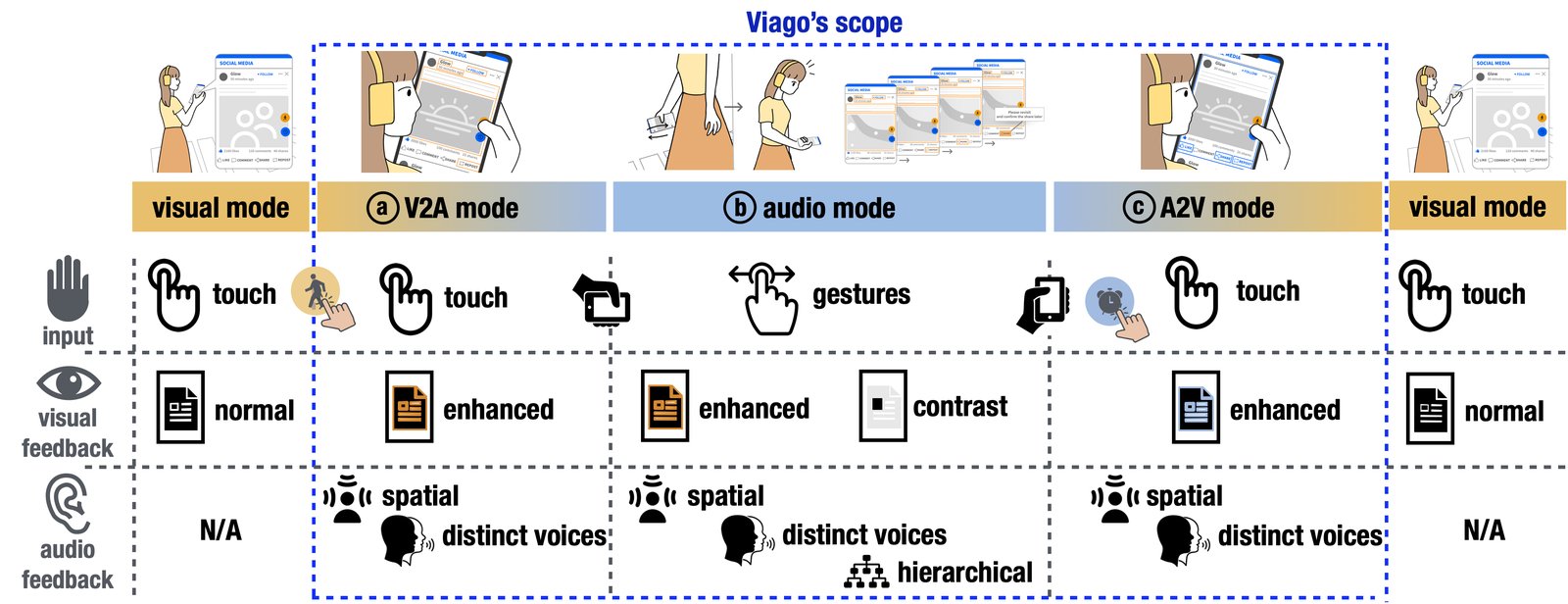
V2A mode. Tapping the orange button outlines the current post in orange (it will be read first) and then outlines the elements that will be available in audio mode: author name, timestamp, post content, images, and the buttons the user cares about. Buttons are picked semi-automatically: an element clicked 3 times within 1 minute is added, and a single tap adds or dismisses any element. In V2A mode, each new post the user scrolls to is announced with an audio headline (author name and timestamp), and tapping a button gives spatial feedback such as “Like button clicked” from the left. The first thing heard in audio mode is therefore already familiar.
Audio mode. It starts when Viago detects that the user has looked away: no face in the front camera and the phone held down at their side. Gestures work anywhere on the screen: swipe up or down for the next or previous post, swipe left or right between elements in a post, single tap to enter or exit a post, and double tap to select. Only the elements chosen in V2A mode are in the list. Spatial audio places sounds where the element sits on screen (the author’s name on the left, buttons on the right), text is read in a female voice and image descriptions in a male voice, and vibrations confirm each gesture. For quick glances, the screen dims everything except the focused element. Actions with high visibility, such as sharing or reposting, are cached.
A2V mode. When the user looks again, a blue button jumps to the first post they heard in audio mode, and tapping it again returns to the latest one. Posts they heard and elements they used are outlined in blue, the same audio headlines play again, and cached actions pop up so they can be confirmed and finished visually.
Viago runs as an Android application on a Pixel 7 Pro and uses Android’s built-in text-to-speech. It reads the screen through Android’s Accessibility Service and flattens the interface into a list for gesture navigation, an approach reused from the design probe.
Studies
We ran two studies: a design probe to learn what people need when switching modalities on the go, and a first-use evaluation of Viago.
Study 1: design probe
Probe. A screen reader-like audio mode that worked on participants’ own apps, with automatic switching between visual and audio modes based on face detection and phone orientation.
Task. In a simulated coffee shop, participants used their phone visually while seated (30 seconds), walked to pick up an order in audio mode (60 seconds), and returned to their seat to continue visually (30 seconds). Chimes marked the transitions. They repeated this for three of their own apps and then brainstormed improvements.
Participants. Ten mobile users (6 male, 4 female) who used apps such as Facebook, LinkedIn, Instagram, Spotify, and Gmail.
What we found. Five insights. People kept a mental picture of the screen layout and wanted anchors to it. Hearing everything on screen was overwhelming, so they wanted hierarchical, distinct audio. They wanted control over what is read and when the mode switches. They wanted a visual cue and connected audio to keep their place across a switch. And they wanted to review and confirm what they did by ear. Social media apps were the most common choice and had the most complex layouts, so we built Viago around them.
Study 2: evaluation
Apparatus. A Google Pixel 7 Pro running Viago and a simulated social media app, with earphones. The study ran in a coffee shop within our organization, with chairs, tables, and hanging lamps as obstacles.
Task. The app had 50 posts, 12 of them by “Judy Moore”. While walking, participants had to share her 6 posts about gardening and like her 6 other posts. Chimes at unplanned moments told them to switch modes immediately, and shares started in audio mode had to be confirmed visually. The 12 tasks took about fifteen minutes.
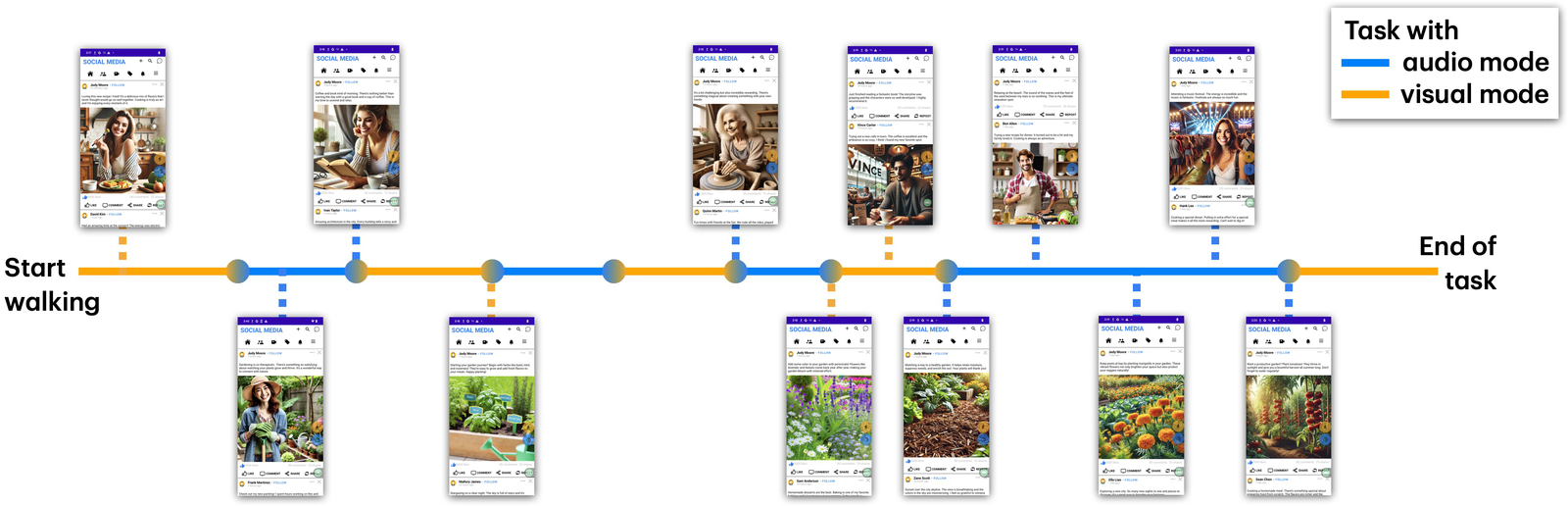
Participants. Thirteen mobile users (10 male, 3 female), aged 24 to 48 (mean 35.7), who all used social media apps daily.
Measures. Success rates for the like and share tasks, 7-point Likert ratings, and video and semi-structured interviews analyzed with affinity diagramming.
What do we learn?
1. People finished the tasks while switching back and forth
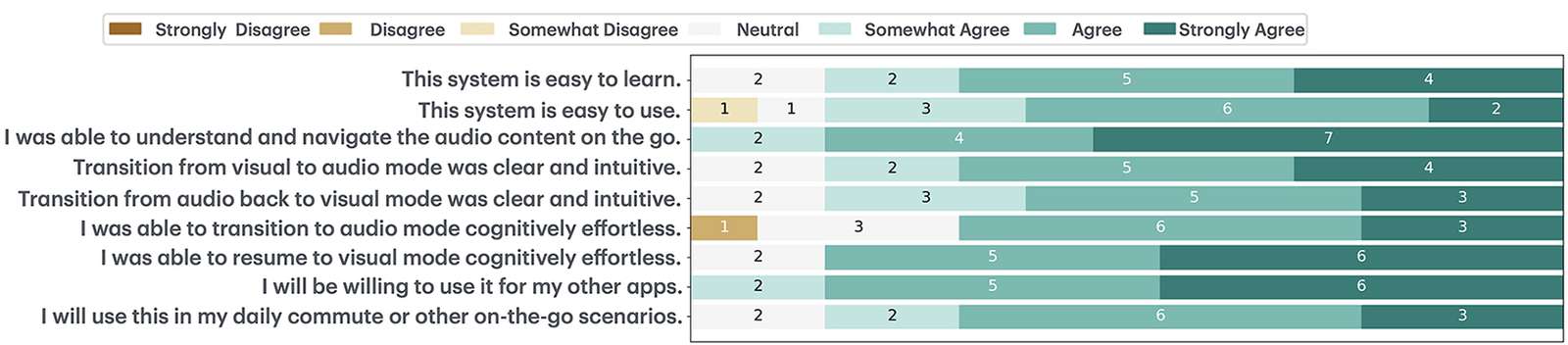
Success rates were 91.67% for likes and 93.06% for shares. Participants rated their ability to understand and navigate the audio content on the go at 6.38 out of 7 (SD 0.78), and rated Viago easy to learn (5.85, SD 1.07) and easy to use (5.54, SD 1.12). As P2 put it: “It was always on the post I expected it to be on when I switched based on the feedback.” Some gestures took getting used to, for example “single tap was excessive” (P9), and “up/down and right/left were confusing when the phone is down” (P12).
2. Spatial audio and two voices helped people picture the screen
Several participants (P2, P4, P6, P9) said they pictured the layout while listening. P2: “In my mental map, I was used to the name being here (pointing left) and the actions being here (pointing right).” The different voices for text and image descriptions also worked as dividers that told people which part of a post they were in. A few still glanced at the screen, for example to check an image when its description was long.
3. Both hand-offs worked, but should take less effort
The V2A previews were rated clear (5.85, SD 1.07) and cognitively effortless (5.46, SD 1.51), and participants valued choosing which elements to bring to audio. But pressing the orange button every time felt cumbersome, and many would prefer automatic transitions. The A2V review was rated clear (5.69, SD 1.03) and cognitively effortless (6.15, SD 1.06). P4: “it had the blue boxes for me to remember where I was.” Participants often overlooked the audio headlines during review because they were focused on the screen, and they wanted a faster review, such as jumping straight to shared posts or a panel that groups liked, commented, and shared posts (P7).
4. People want this beyond social media, with caveats
Participants were willing to use Viago with other apps (6.3, SD 0.75), such as news, music, messaging, and navigation, and were open to using it on the go (5.77, SD 1.01). They also raised real-world concerns, such as ambient noise, bumping into people, and busy places that need full attention.
Design implications
- Automate the audio information hierarchy for different apps. Use UI semantics, existing datasets and algorithms, or large language models to group elements into audio-friendly levels, and let users adjust the result.
- Make transitions context-aware. Phone sensors and map services (location, activity, how busy a place is) could set how much is automated and how much information goes to audio.
- Personalize gestures for different apps. Interaction proxies could let users remap gestures to app functions and to levels of the audio hierarchy.
- Match visual and audio output to the context. For example, gaze tracking could reveal what the user has already seen so that audio fills in the rest.
- Extend to other devices. Smartwatches and head-mounted displays could share the work across audio, visual, and haptic output.
Limitations
The audio mode followed screen reader conventions, which may not match what sighted users expect; some participants wanted more conversational interaction with the screen. We tested only a simulated social media app, and apps with richer structure (such as Reddit) or tasks that need text input were out of scope. Study 2 was a preliminary first-use study with a small sample in a controlled setting, chosen for safety; field deployments with more people and apps are future work.
Publication
Ruei-Che Chang, Tovi Grossman, Carine Rognon, Michael Glueck, Christopher Collins, Amy Karlson, and Hemant Bhaskar Surale. 2025. Viago: Exploring Visual-Audio Modality Transitions for Social Media Consumption on the Go. In Proceedings of the 38th Annual ACM Symposium on User Interface Software and Technology (UIST ‘25), Busan, Republic of Korea. ACM, 1-20. https://doi.org/10.1145/3746059.3747761
BibTeX
@inproceedings{ruei2025viago,
  title     = {Viago: Exploring Visual-Audio Modality Transitions for Social Media Consumption on the Go},
  author    = {Chang, Ruei-Che and Grossman, Tovi and Rognon, Carine and Glueck, Michael and Collins, Christopher and Karlson, Amy and Surale, Hemant Bhaskar},
  booktitle = {Proceedings of the 38th Annual ACM Symposium on User Interface Software and Technology},
  series    = {UIST '25},
  location  = {Busan, Republic of Korea},
  pages     = {1--20},
  year      = {2025},
  publisher = {ACM},
  doi       = {10.1145/3746059.3747761}
}
Contact
Questions? Feel free to contact:
- Ruei-Che Chang, Reality Labs Research, Meta: rueiche [at] umich.edu
- Hemant Bhaskar Surale, Reality Labs Research, Meta: hemant.surale [at] gmail.com
Figures are from the paper (© 2025 copyright held by the owner/author(s)) and are reproduced here by the authors.