Switch menu modes with a glance
1LMU Munich · 2University of Waterloo · 3Bundeswehr University Munich · 4Aarhus University
Short paper · ETRA '23: 2023 Symposium on Eye Tracking Research and Applications, Tübingen, Germany
Quick facts
Changing modes on a tablet usually means moving the pen or finger up to a menu and back. We let the eyes make that trip instead: look at the menu item, then confirm by dwelling or with a tap wherever the hand already is. Led by Yanfei Hu Fleischhauer (LMU Munich). Overall, our work contributes:
- The first investigation of mode-switching between manual and gaze input, using the subtraction method to isolate the cost of a mode switch inside a drawing workflow.
- Empirical evidence (N=18) that users switch efficiently between gaze and hand, that gaze saves manual effort, and that users prefer gaze-based methods over the familiar hand baseline.
- A new technique, GazeTap*, that unifies selecting a mode and applying it, and saved substantial time in a follow-up study (N=6).
Abstract
In design work, a common task is the interaction with menus to change the drawing mode. Done frequently, this can become a tedious and fatiguing task, especially for tablets where users physically employ a stylus or finger touch. As our eyes are naturally involved in visual search and acquisition of desired menu items, we propose gaze to shortcut the physical movement. We investigate gaze-based mode-switching for menus in tablets by a novel mode-switching methodology, assessing a gaze-only (dwell-time) and multimodal (gaze and tap) technique, compared to hand-based interaction. The results suggest that users can efficiently alternate between manual and eye input when interacting with the menu; both gaze-based techniques have lower physical demand and individual speed-error trade-offs. This led to a novel technique that substantially reduces time by unifying mode-selection and mode-application. Our work points to new roles for our eyes to efficiently short-cut menu actions during the workflow.
The idea: let the eyes make the trip to the menu
A mode switch has three steps: find the menu item, move the hand to select it, and move the hand back to the workspace. The eyes already do the first step, so we let them do the selection as well, and the hand stays on the canvas. To measure what one switch costs inside a real workflow, rather than in an isolated selection task, we used the subtraction method.
Experiment
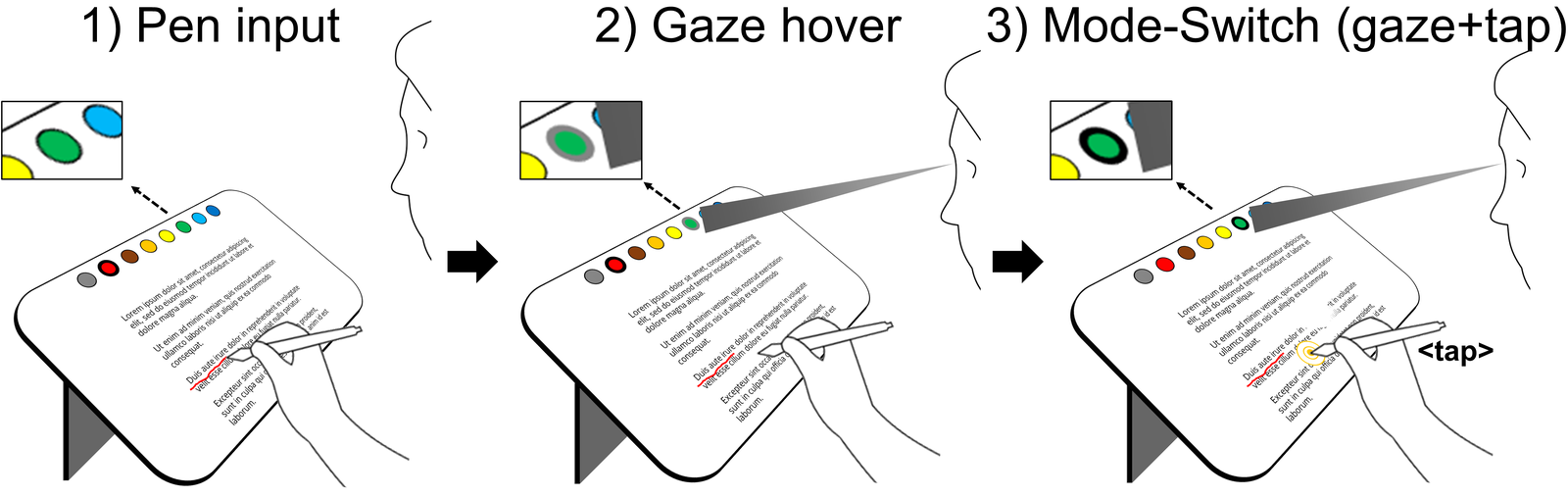
Techniques. Dwell: looking at a menu item for 500 ms selects it, with visual feedback when the item is viewed and when the selection is confirmed. GazeTap: look at the item (its border highlights), then tap with the pen or finger at the current position to confirm. Baseline: move the pen or finger to the menu item, the default in today’s apps. Each technique was done with the pen and with finger touch, giving 3 × 2 conditions in Latin square order.
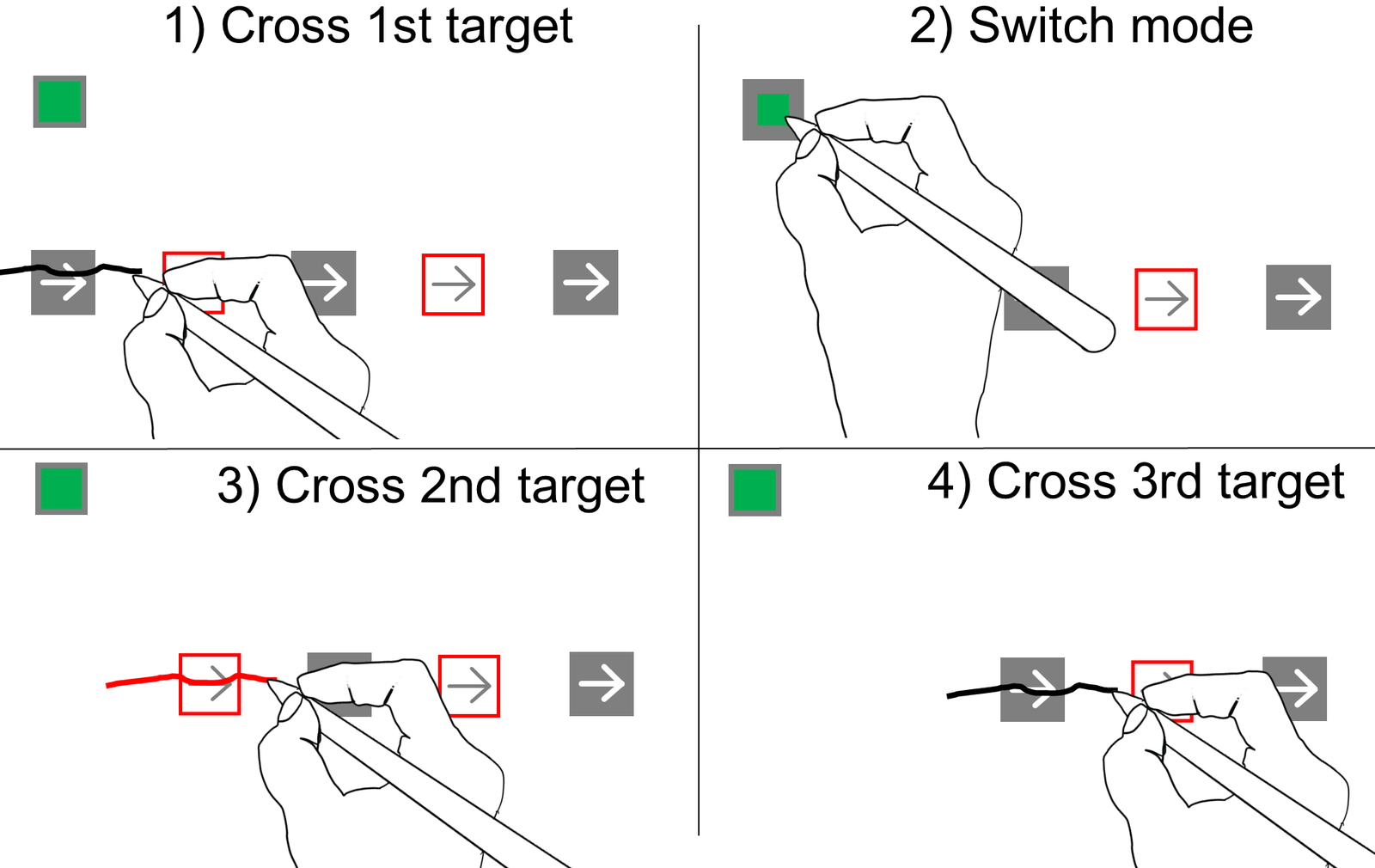
Task. Participants crossed rectangles with strokes, a task adapted from Dillon et al. and Surale et al. Baseline blocks had five crossings and no menu selection. Compound blocks had the same five crossings, but before crossings 2 and 4 the participant had to select the color mode that matched the outlined target. Menu items appeared at three positions along the top of the screen, and the crossing direction changed between blocks, for 720 crossings per participant.
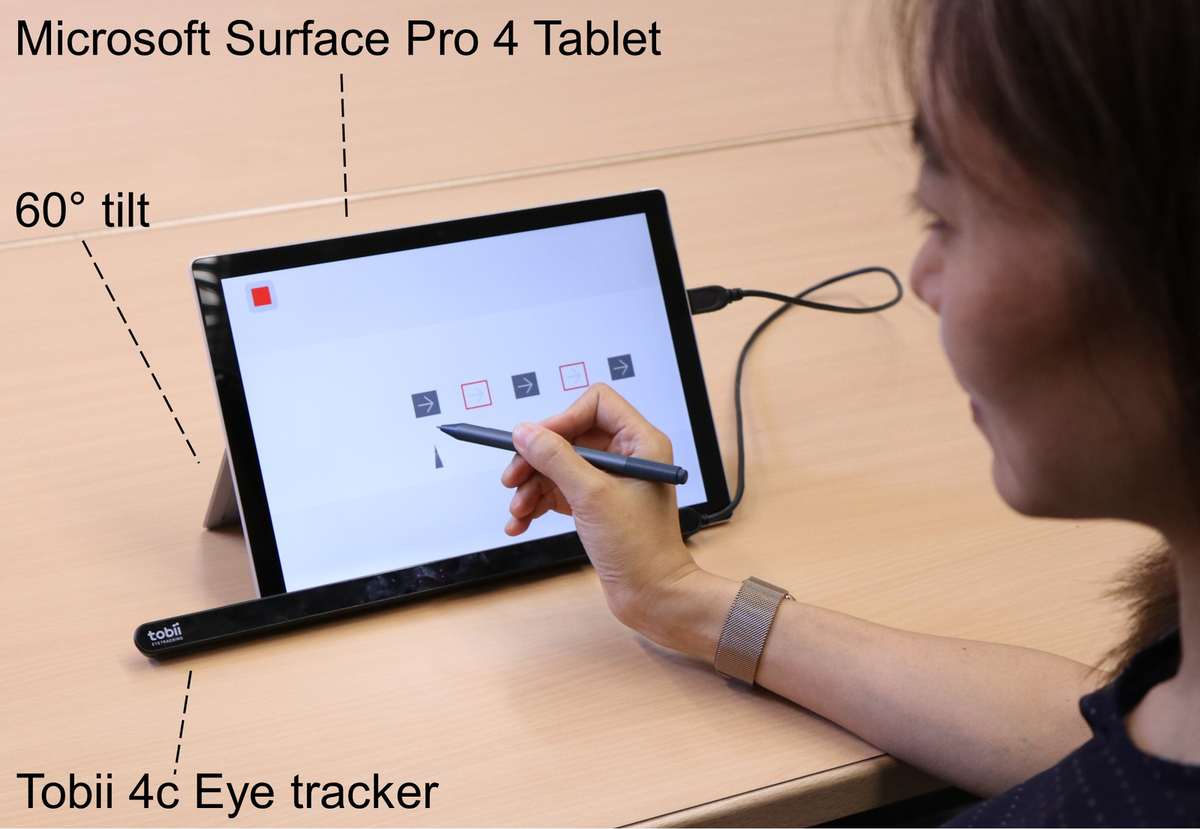
Apparatus. Software written in Java with Processing on a Microsoft Surface Pro 4 (12.3”, 2736×1824 px) with a Surface Pen and a Tobii 4c eye tracker, with participants seated about 60 cm from the screen. Gaze techniques used an invisible 4×4 cm selection area around each menu item, and a post-hoc check put gaze accuracy at about 1 cm (about 0.954° of visual angle). The crossing targets sat on the right side of the screen so that the hands would not block the eye tracker.
Participants. 18 paid participants (9 female, 9 male, all right-handed), aged 20 to 56 (M = 27.97). On a 1 to 5 scale they rated themselves as moderately experienced with tablets (M = 3.77) and less experienced with gaze (M = 2.37) and pen input (M = 1.9). A session took 45 to 50 minutes.
Measures. Menu selection time from the subtraction method (mean cycle time in compound blocks minus mean cycle time in baseline blocks); crossing, out-of-target, and mode errors; six usability ratings; and a final ranking of the techniques.
What do we learn?
1. People mix eyes and hands without trouble
All participants used gaze for quick menu switches during hand-controlled drawing, in every trial, after about 30 seconds of training per technique. Both gaze techniques removed the hand’s trip to the menu, and hand fatigue was rated significantly lower for Dwell and GazeTap than for the manual baseline. The trade-off was eye fatigue, which was rated higher for Dwell than for the baseline.
2. Skipping the hand trip cost about a quarter of a second
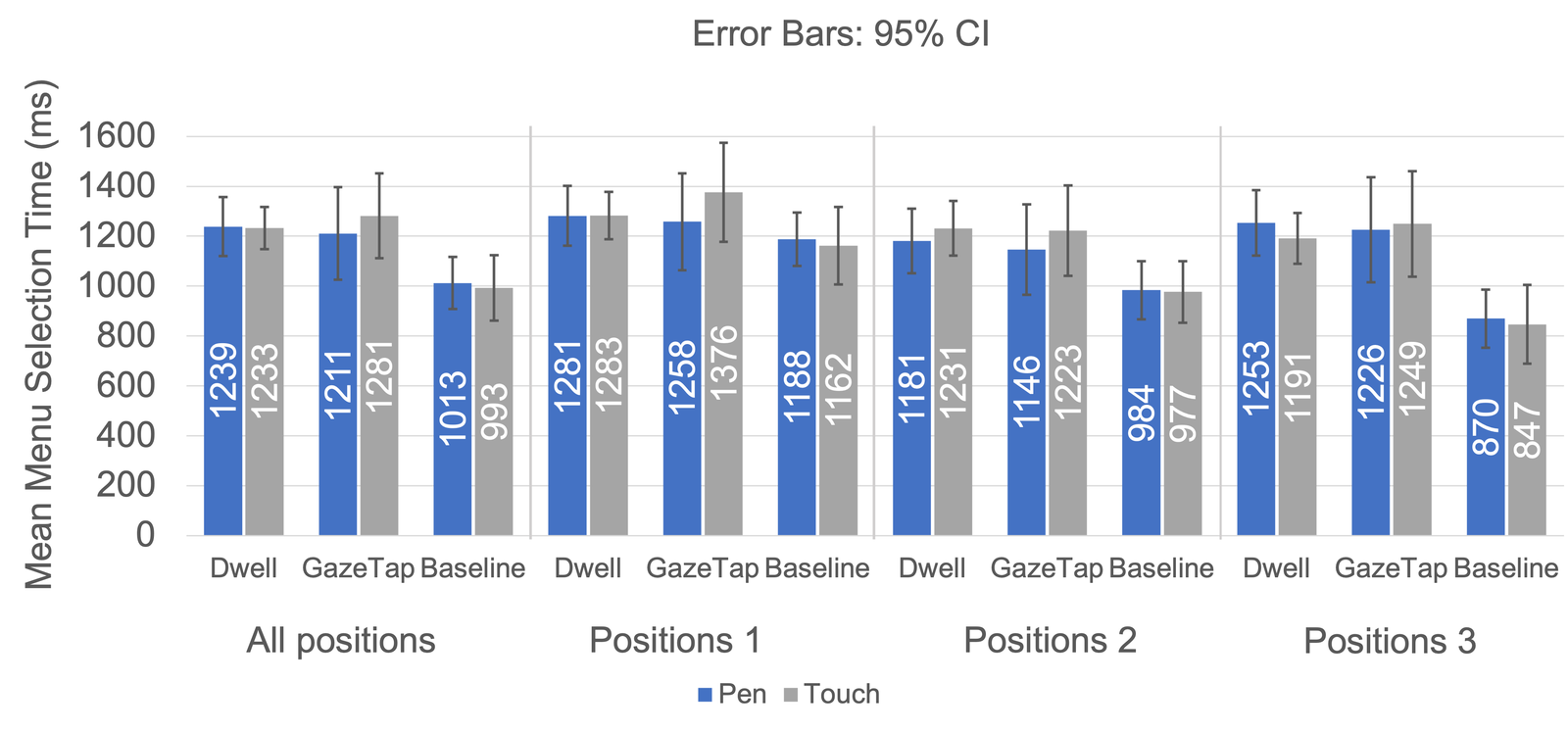
Mean menu selection time was 1003 ms for the manual baseline, 1236 ms for Dwell, and 1246 ms for GazeTap. The baseline was significantly faster than both gaze techniques (F(1.715, 29.161) = 12.032, p < .001). Between the two gaze techniques, Dwell caused significantly fewer errors than GazeTap and was rated easier to use and faster.
3. Most people still preferred gaze
16 of 18 participants ranked a gaze technique first: Dwell 9 times (5 with pen, 4 with touch) and GazeTap 7 times (5 with pen, 2 with touch), against 2 for the hand baseline. P16: “Gaze dwell is very intuitive, as you automatically look at the colour square”. Those who preferred the hand found the coordination hard: “I thought it is difficult to switch between two modalities” (P9).
4. Keep drawing after the tap, and switching gets much faster
GazeTap* extends GazeTap: the user looks at the menu item and touches down to switch the mode, then keeps dragging to draw the line without lifting the pen or finger. This joins selecting a mode and applying it into one continuous action. In a follow-up with 6 participants, menu selection time with GazeTap* averaged about 519 ms (525 ms pen, 513 ms touch), 46.6% faster than the manual baseline and 59.8% faster than Dwell (both p < .001).
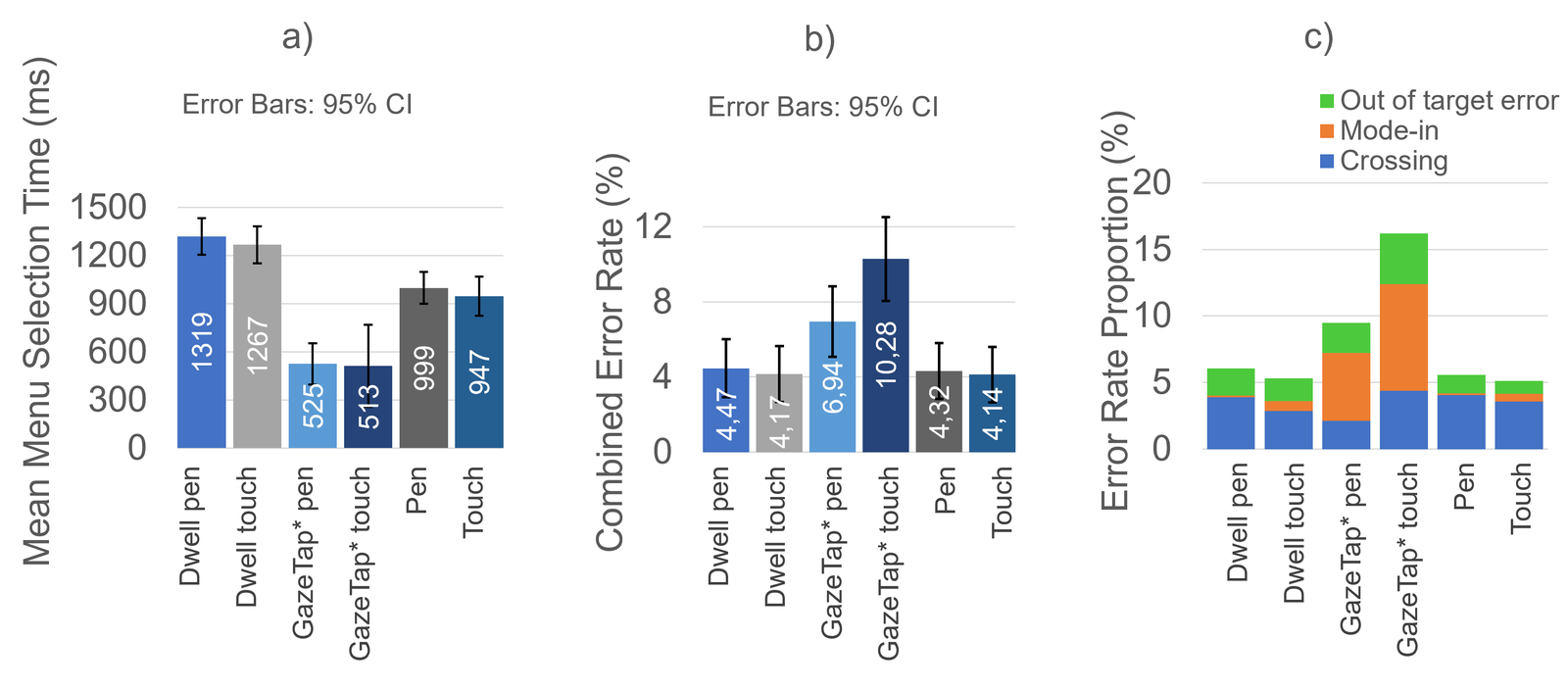
Errors went up (6.94% with pen and 10.28% with touch, versus about 4% for the others), although post-hoc tests found no significant differences. Gaze data suggests why: with GazeTap*, the eyes were still far from the target, on the menu, when the stroke began, so users started drawing eyes-free. The technique may therefore suit rapid, short ink strokes, or tasks where the stroke does not need to start at a precise spot.
Limitations
We ran both studies in a lab. On the move, hands may be less steady, which could make gaze shortcuts more useful, but eye tracking may be less precise. Participants were students and employees of the local university; other groups, such as older users, may benefit more from reduced physical effort. The follow-up study was small (N=6) and has limited statistical power. Finally, our menu targets were large by the standards of regular menus, though typical for gaze interfaces; nested menus could address this.
Publication
Yanfei Hu Fleischhauer, Hemant Surale, Florian Alt, and Ken Pfeuffer. 2023. Gaze-based Mode-Switching to Enhance Interaction with Menus on Tablets. In 2023 Symposium on Eye Tracking Research and Applications (ETRA ’23), Tübingen, Germany. ACM, Article 7, 8 pages. https://doi.org/10.1145/3588015.3588409
BibTeX
@inproceedings{hu2023gaze,
  title     = {Gaze-based Mode-Switching to Enhance Interaction with Menus on Tablets},
  author    = {Hu Fleischhauer, Yanfei and Surale, Hemant Bhaskar and Alt, Florian and Pfeuffer, Ken},
  booktitle = {2023 Symposium on Eye Tracking Research and Applications},
  series    = {ETRA '23},
  location  = {Tübingen, Germany},
  articleno = {7},
  numpages  = {8},
  pages     = {1--8},
  year      = {2023},
  publisher = {ACM},
  doi       = {10.1145/3588015.3588409}
}
Contact
Questions? Feel free to contact:
- Yanfei Hu Fleischhauer, LMU Munich: yanfei.hu [at] campus.lmu.de
- Hemant Bhaskar Surale, University of Waterloo: hemant.surale [at] gmail.com
Figures are from the paper (© 2023 ACM) and are reproduced here by the authors.