Smartphone typing without the smartphone
1Reality Labs Research, Meta · 2University of Toronto · 3KAIST · 4Carnegie Mellon University
Conference paper · UIST '23: ACM Symposium on User Interface Software and Technology, San Francisco, CA, USA
Quick facts
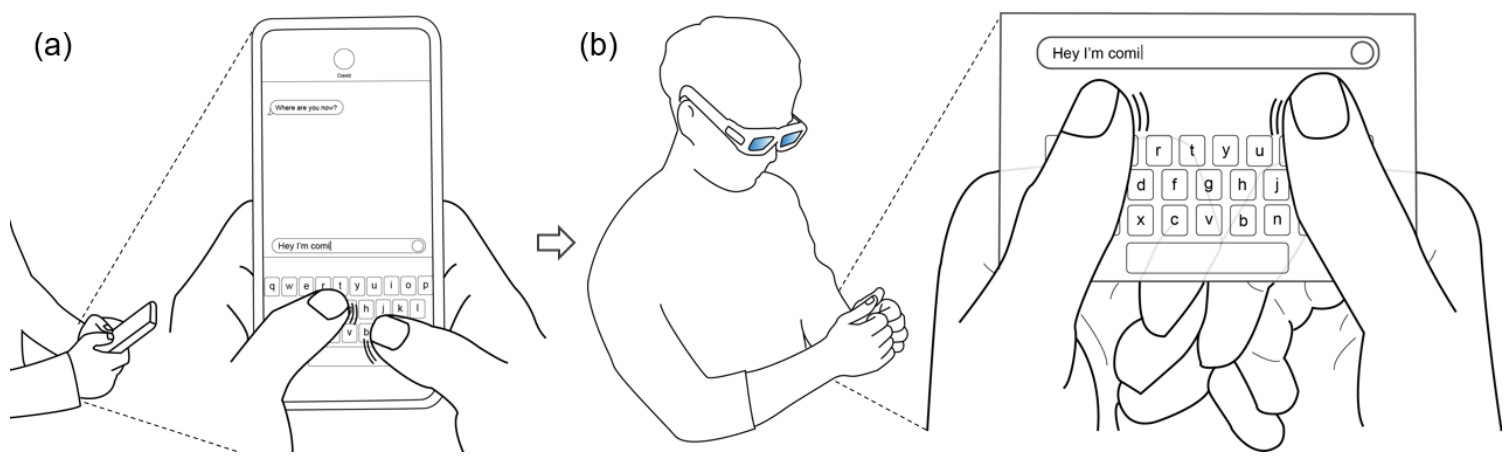
Led by Taejun Kim as a research intern at Reality Labs Research, Meta. STAR lets you type in AR the way you type on a phone: hold your hands as if gripping one, and tap with both thumbs on a virtual keyboard overlaid on the sides of your index fingers. Overall, our work contributes:
- STAR, an on-skin, smartphone-analogous AR text entry technique that reuses the two-thumb typing skills people already have from their phones.
- An exploration of skill transfer from smartphone typing to AR. An elicitation study with 29 participants found three hand postures for typing on an imaginary phone, and we then tested these postures and other design parameters to keep the skill transferable.
- An analysis of the gap between STAR and smartphone typing, which shows that better hand tracking and thumb tap sensing could bring STAR closer to phone typing speeds.
Abstract
While text entry is an essential and frequent task in Augmented Reality (AR) applications, devising an efficient and easy-to-use text entry method for AR remains an open challenge. This research presents STAR, a smartphone-analogous AR text entry technique that leverages a user’s familiarity with smartphone two-thumb typing. With STAR, a user performs thumb typing on a virtual QWERTY keyboard that is overlain on the skin of their hands. During an evaluation study of STAR, participants achieved a mean typing speed of 21.9 WPM (i.e., 56% of their smartphone typing speed), and a mean error rate of 0.3% after 30 minutes of practice. We further analyze the major factors implicated in the performance gap between STAR and smartphone typing, and discuss ways this gap could be narrowed.
The idea: keep the skill, drop the phone
Two-thumb typing on a phone is a fast skill most people already have. Bare-hand text entry in AR usually asks for something new instead (mid-air typing, eye typing, tapping on a fingertip), and mid-air keyboards give you nothing to press against. STAR keeps what transfers from the phone: the grip, the QWERTY layout, the thumb movements, and a physical surface under the thumbs. Your own skin takes the place of the touchscreen.
How a typing session works:
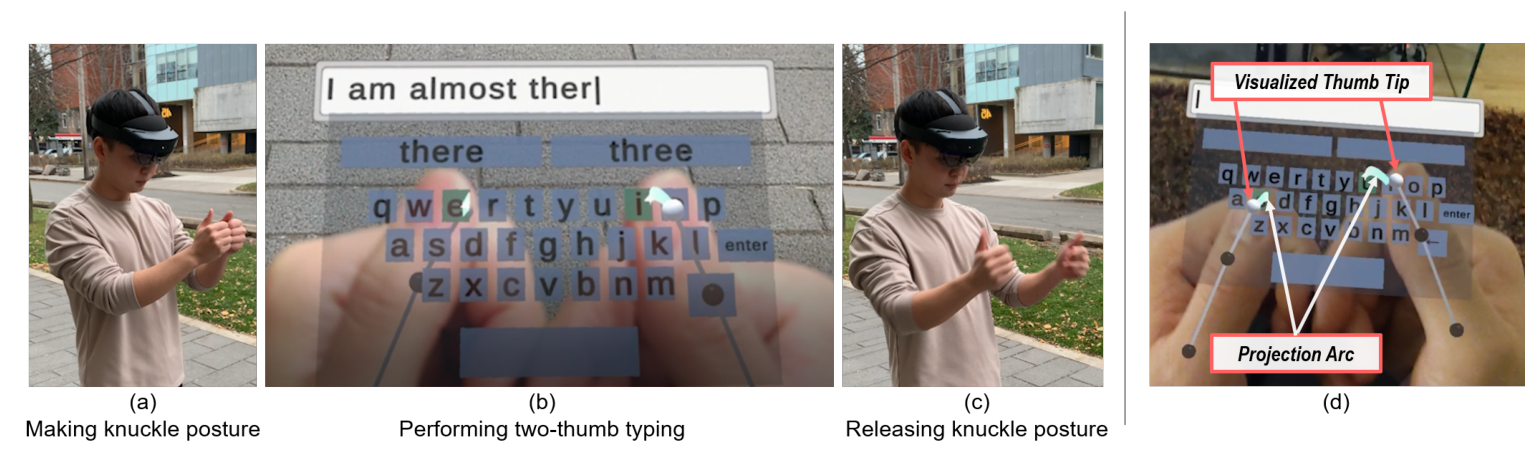
- Open and close. Making the “knuckle posture” opens the keyboard over your hands, and releasing it closes the keyboard. The hand contact makes the mode switch explicit and prevents false activations.
- See your thumbs. STAR draws all three tracked thumb joints and a projection arc from the thumb tip to the keyboard, and highlights the key at the end of the arc. With only the thumb tip shown, people often hit the key next to the one they aimed at, because the thumb tip moves in an arc rather than straight down.
- Feel the tap. Each tap lands on your own skin, so there is real haptic feedback.
- Finish words. A decoder combines where each tap landed (a bivariate Gaussian around each key) with word frequencies and offers the two most likely words above the keyboard.
Designing STAR
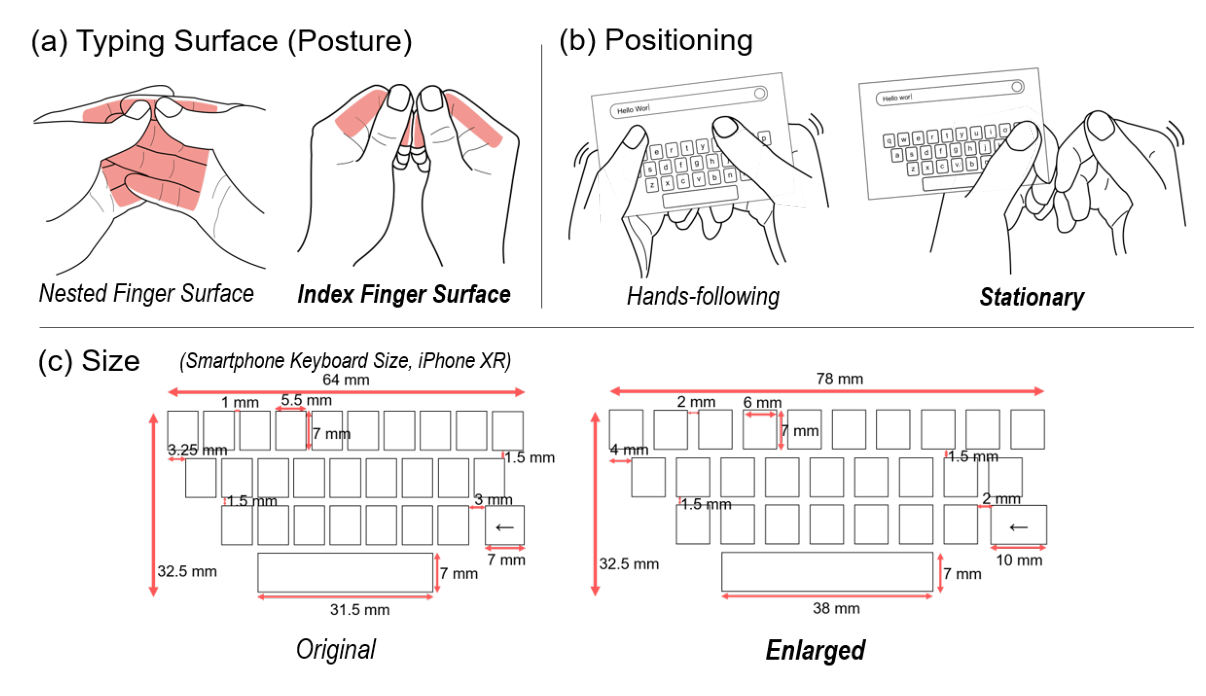
Elicitation. Over video calls, 29 people (19 women, 10 men, mean age 38) typed “The quick brown fox jumps over the lazy dog” on an imaginary phone in their hands. 27 of them used both thumbs, and 26 of those 27 kept their hands in contact. Three postures emerged: the Nested Finger Surface (n = 20), the Index Finger Surface (n = 6), and the Single Palm Surface (n = 2).
Typing surface. In a HoloLens 2 prototype, the Nested Finger Surface was uneven, because one hand sits behind the other, and taps were unstable. The flatter Index Finger Surface gave more consistent presses, so we chose it even though fewer participants had proposed it.
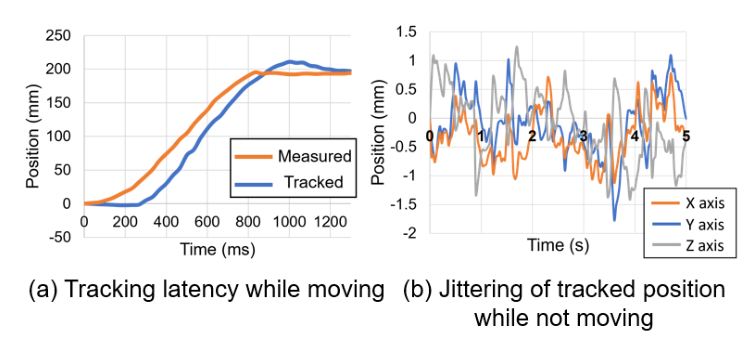
Positioning. A keyboard that followed the hands still shook with tracking jitter, even with a 1-euro filter, and with gaps of 1–2 mm between keys even a tiny shift caused errors. A Stationary keyboard, fixed where the knuckle posture was made, let people type more confidently.
Size. The phone’s own layout (5.5 mm keys, 1 mm apart) was too small for about ±1 mm of tracking jitter. After trying 6, 7, and 8 mm keys with 2, 3, and 4 mm gaps, we chose an Enlarged keyboard with 6 mm keys and 2 mm gaps.
System
STAR runs as a Unity app on a Microsoft HoloLens 2 (52° diagonal field of view). Its hand tracking had a latency of about 90 ms and a jitter of about ±1 mm, which shaped choices such as the Stationary keyboard. Tracking alone could not tell exactly when a thumb touched the finger, so key presses and the felt touch were often out of sync. For the study, we put capacitive tape on each thumb tip, read by an Arduino and relayed through a PC to the headset over TCP: a tap started when the reading rose above 250 and ended when it fell below 200.
Experiment
Conditions. STAR, plus typing on a physical smartphone as a baseline. The goal was to see how close STAR could get to the phone, not to beat it, so the smartphone was tested once before and once after the STAR blocks. The two smartphone speeds did not differ significantly (39.9 vs. 39.0 WPM), so we averaged them into a 39.4 WPM baseline.
Apparatus. STAR on the HoloLens 2 with the thumb-tip capacitive tape, as described above. The smartphone baseline was a Galaxy A13 5G running an Android app with the Original keyboard layout.
Task. Participants sat on a chair without armrests, facing a plain wall, and transcribed phrases from the MacKenzie and Soukoreff phrase set. Each block had ten phrases: one smartphone block, five STAR blocks, then a final smartphone block, with breaks of at least two minutes. The whole session took about two hours.
Participants. Ten people from a university community (2 women, 8 men, mean age 25). Eight had no prior AR experience, two were left-handed, and two wore glasses.
Measures. Text entry speed in words per minute (WPM), uncorrected error rate (UER), corrected error rate (CER, which also counts backspaced errors), backspace count, inter-key interval (IKI), and key press duration (KPD), plus a post-study interview.
What do we learn?
1. About 22 WPM after 30 minutes
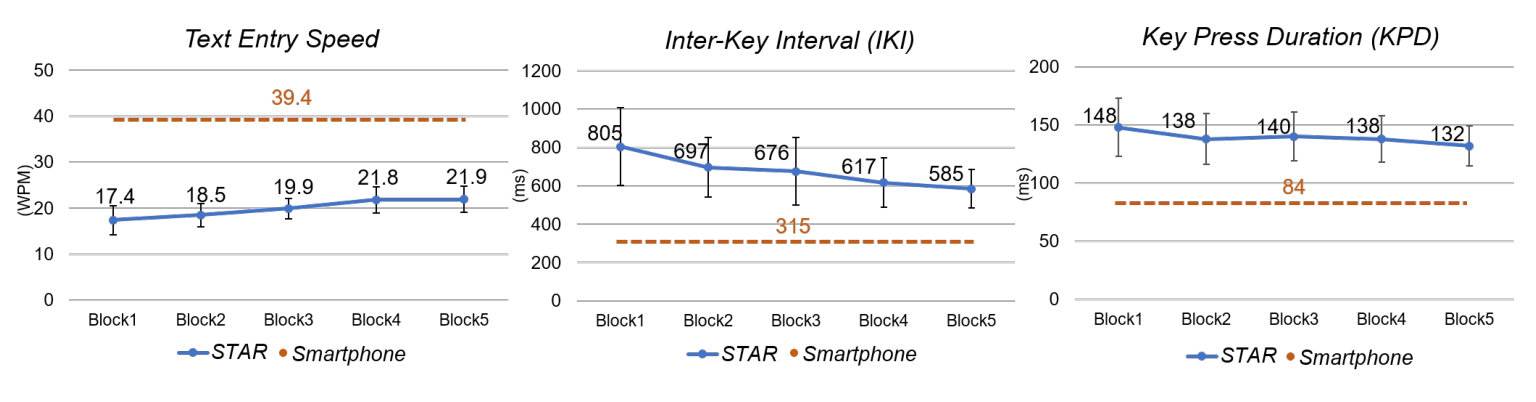
Typing speed rose from 17.4 WPM in Block 1 to 21.9 WPM in Block 5 (F(4,36) = 10.996, p < .001). That is 56% of participants’ smartphone speed of 39.4 WPM. In the last block, the fastest participant reached 25.0 WPM and the slowest 16.4 WPM.
2. Errors stayed at smartphone levels
Uncorrected errors averaged 0.2% with STAR and 0.5% with the smartphone (0.3% in STAR’s last block). Corrected error rates (8.5% vs. 8.3%) and backspace use (3 vs. 2.6) were also similar, so people fixed mistakes about as often as on a phone. None of the error measures changed significantly across STAR blocks.
3. The gap is in the timing, and hand tracking is the main cause
In Block 5, the time between keys was 585 ms with STAR versus 315 ms on the phone, 1.9 times longer, which matches the speed ratio. Each press also lasted longer (139 ms vs. 84 ms). Half of the participants said they had to keep checking the visualized thumb to avoid mistakes. P6 put it this way: “the [visualized] thumb couldn’t follow my speed when I moved my finger quickly from one key to another”. We suspect people waited for the lagging thumb marker to confirm that the right key had been pressed.
The fixed keyboard also played a role. On a phone, the keys move with your hands, so muscle memory works. With the Stationary keyboard, people had to keep their hands aligned with it, and three participants asked for a keyboard that follows the hands: the design we had dropped because tracking was too unstable. We expect STAR to get closer to phone speeds as headset tracking improves, or with extra sensing that leaves the thumbs free, such as rings, smartwatches, or bracelets.
Limitations
STAR was not fully bare-hand in our study: capacitive tape on the thumb tips sensed the taps. A real deployment needs robust hand tracking and tap sensing, which is hard from the headset alone because parts of the hand can be hidden from its cameras. We tested only in a lab, seated, in front of a plain wall, so typing while standing, walking, lying down, or doing something else is untested. Because we used the headset’s own tracking rather than motion capture, STAR’s performance with ideal tracking is still unknown; varying latency and jitter systematically could show how much precision smartphone-level typing needs. We studied two-thumb typing with one standard keyboard size, so one-handed STAR (for example, with gesture typing) and keyboards sized to each person’s hands remain open.
Publication
Taejun Kim, Amy Karlson, Aakar Gupta, Tovi Grossman, Jason Wu, Parastoo Abtahi, Christopher Collins, Michael Glueck, and Hemant Bhaskar Surale. 2023. STAR: Smartphone-analogous Typing in Augmented Reality. In Proceedings of the 36th Annual ACM Symposium on User Interface Software and Technology (UIST ‘23), San Francisco, CA, USA. ACM, 13 pages. https://doi.org/10.1145/3586183.3606803
BibTeX
@inproceedings{kim2023star,
  title     = {STAR: Smartphone-analogous Typing in Augmented Reality},
  author    = {Kim, Taejun and Karlson, Amy and Gupta, Aakar and Grossman, Tovi and Wu, Jason and Abtahi, Parastoo and Collins, Christopher and Glueck, Michael and Surale, Hemant Bhaskar},
  booktitle = {Proceedings of the 36th Annual ACM Symposium on User Interface Software and Technology},
  series    = {UIST '23},
  location  = {San Francisco, CA, USA},
  pages     = {1--13},
  year      = {2023},
  publisher = {ACM},
  doi       = {10.1145/3586183.3606803}
}
Contact
Questions? Feel free to contact:
- Taejun Kim, Reality Labs Research, Meta: taejun.kim [at] kaist.ac.kr
- Hemant Bhaskar Surale, Reality Labs Research, Meta: hemant.surale [at] gmail.com
Figures are from the paper (© 2023 the authors, publication rights licensed to ACM) and are reproduced here by the authors.