Dropping in on a friend's smartglasses
1University of Waterloo, Canada · 2Snap Inc., USA · 3Columbia University, USA · *Co-principal investigators
Conference paper · AHs '22: Augmented Humans 2022, Kashiwa, Chiba, Japan
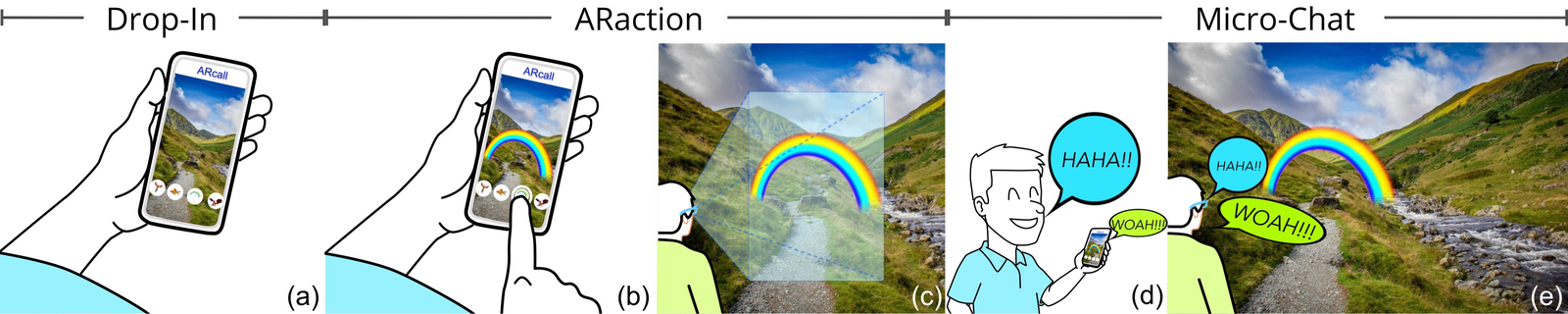
Quick facts
Today, sharing AR with a friend often means sending a pre-recorded video with effects on top, without knowing where they are. ARcall instead connects a friend on a smartphone with a smartglasses wearer in real time: the friend sees the wearer’s view, places AR content directly into it, and the two talk, in short sessions that respect the glasses’ battery and the wearer’s privacy. Overall, our work contributes:
- An understanding of user behaviour and affordances created by this AR-based, real-time communication method, with a design that takes into account the practical limits of modern smartglasses.
- A qualitative evaluation of ARcall’s key components with 14 participants, showing the importance of context priming through Drop-In, engagement through ARaction, and meaningful conversation through Micro-Chat.
Abstract
Augmented Reality (AR) smartglasses are increasingly regarded as the next generation personal computing platform. However, there is a lack of understanding about how to design communication systems using them. We present ARcall, a novel Augmented Reality-based real-time communication system that enables an immersive, delightful, and privacy-preserving experience between a smartphone user and a smartglasses wearer. ARcall allows a remote friend (Friend) to send and project AR content to a smartglasses wearer (Wearer). The ARcall system was designed with the practical limits of existing AR glasses in mind, including shorter battery life and a reduced field of view. We conduct a qualitative evaluation of the three main components of ARcall: Drop-In, ARaction, and Micro-Chat. Our results provide novel insights for building future AR-based communication methods, including, the importance of context priming, user control over AR content placement, and the feeling of co-presence while conversing.
The idea: drop in, augment, talk
The Wearer starts an ARcall session and invites one Friend. During that session the Friend can drop in at any time, see what the Wearer sees, send AR content into the Wearer’s glasses, and talk. Each drop-in is short to save the glasses’ battery, and only the Wearer can extend it.
Each component answers a practical problem with AR glasses. Drop-In lets the Friend check the Wearer’s context before doing anything, the way a caller might ask “is this a good time?”. ARaction augments the Wearer’s world directly, instead of sending pre-recorded AR content or streaming the caller. Micro-Chat keeps voice short, because streaming video and audio drains smartglasses batteries quickly.
System
Design considerations. We designed ARcall around five considerations: give the Wearer control and the Friend freedom (D1), respect the Wearer’s privacy (D2), make AR content relevant and well placed (D3), accommodate the narrow field of view (D4), and handle power constraints (D5). For example, invitations are for a single Friend and expire automatically, the Wearer can blur their video feed, and AR content is restricted to virtual objects rather than whole-world reskins, since Wearers found partial augmentation more compelling.
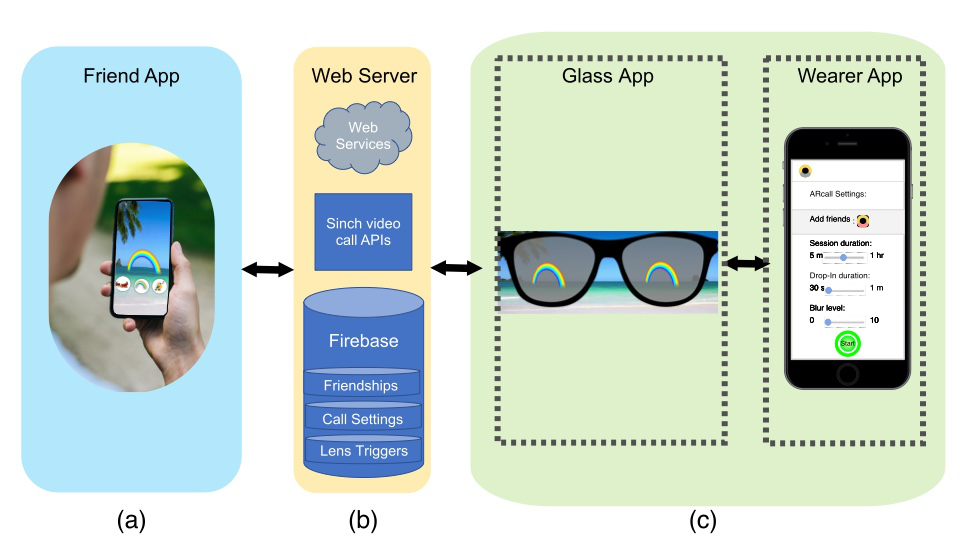
Drop-In. In the Wearer App, the Wearer picks the Friend, a blur level from 0 (clear video) to 10 (fully blurred), the ARcall session length (5 minutes to an hour), and the Drop-In length. We tested how long the glasses could stream video before getting too hot, and limited each drop-in to between 30 seconds and one minute. The Friend gets an invitation and can drop in at any time by tapping it, which shows the Wearer’s camera feed in the center of the phone.
ARaction. The Friend scrolls through a carousel of ten pieces of AR content and sends one with a tap. Animated 3D objects, such as a bird or a dragon, appear in the middle of the glasses’ display and follow the Wearer’s head. Particle effects, such as snow, cover the whole display. One piece is shown at a time, but the Friend can send as many as they like.
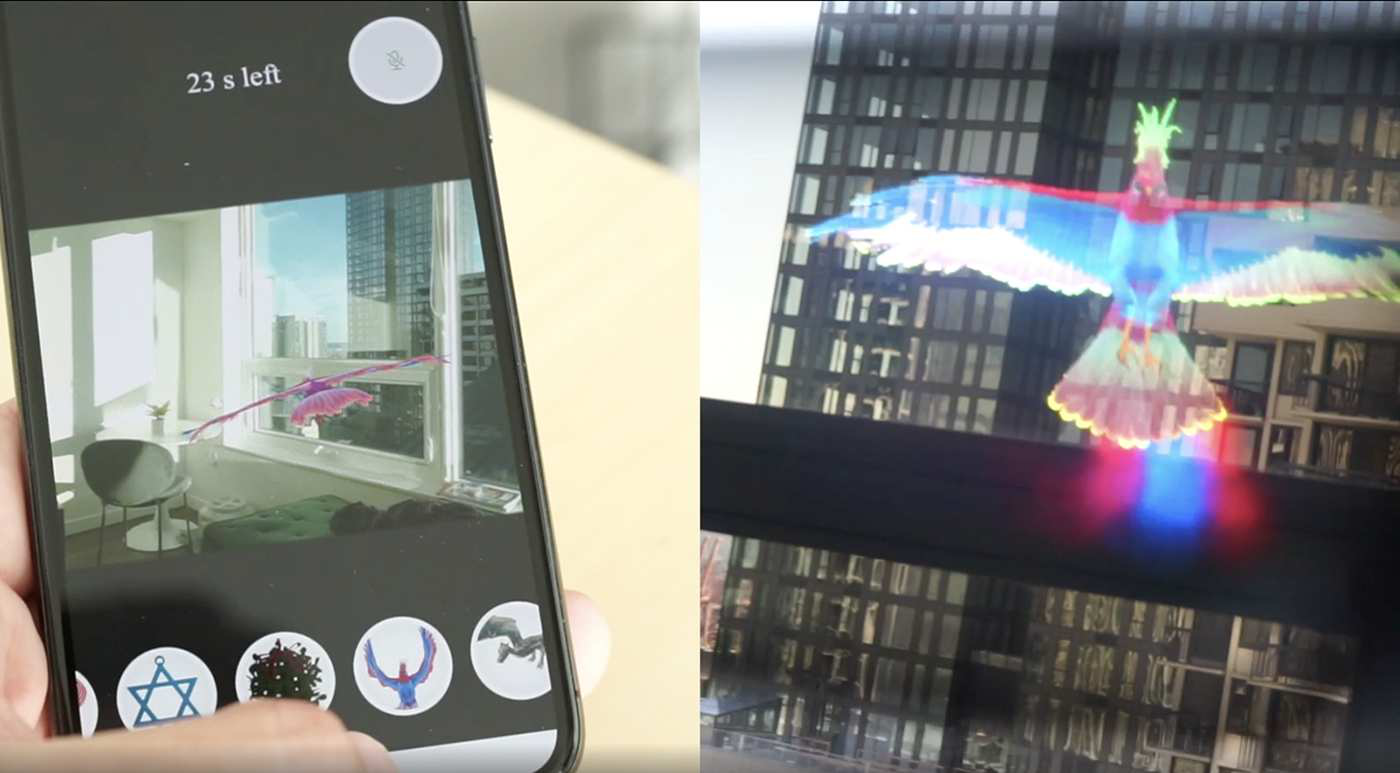
Micro-Chat. A voice call starts as soon as the Friend drops in and lasts as long as the drop-in. The Glass App shows a countdown, and the Wearer can add 30 seconds at a time by pressing a button on the right temple of the glasses. The Friend can mute or unmute their microphone.
Implementation. We built ARcall on Snap’s 4th generation AR Spectacles (2021). The Glass App is written in Java for Android, and the Wearer and Friend Apps in Swift for iOS (the Friend App renders AR with ARKit, SceneKit, and SpriteKit). Video calls use the Sinch API, settings are stored in Firebase, and end-to-end latency is around 100 ms.
First-use study
Participants. 14 people (4 women, 10 men; 2 in their 20s and 12 in their 30s) took part in pairs of friends, for seven sessions in total. Six had used smartglasses before.
Procedure. After a 20-minute onboarding, the Wearer took a walk outside and invited the Friend, who stayed in a conference room, and the pair used ARcall for 10 to 15 minutes. Since the study ran during the holiday season, the AR content was holiday and fantasy themed. To see whether context shaped what Friends sent, we placed six visual artifacts along the Wearer’s path, each subtly matching a piece of AR content (for example, a news poster with a dragon). Each session took about an hour.
Measures. App logs, a post-experience questionnaire with 7-point Likert items (1 = strongly disagree, 7 = strongly agree), and a semi-structured interview. Two researchers coded the responses and merged their findings into themes.
What do we learn?
1. People kept dropping in and extending
The median drop-in lasted 1.9 minutes, and Friends sent a median of 11 pieces of AR content per drop-in. Over 200 pieces were sent in total, and Wearers extended drop-ins 48 times. Overall, participants felt ARcall would add great value to smartglasses (median 6 of 7).
2. Seeing the Wearer’s view made AR content feel personal
Wearers felt the content their Friends sent was relevant to their context (median 6), that it augmented their reality (median 6), and that they understood the intent behind it (median 6). Friends picked up on the artifacts we had placed on the path, so Wearers felt the content was hand-picked: “Based on what I was looking at, they augmented the AR content to my reality, and it was pretty spot on” (W3). Both sides also described the content as surprising and fun.

3. Invite-only felt safe, but Wearers wanted to know when a Friend arrived
Wearers strongly agreed that the invite-only design was important for controlling their privacy (median 7). Most set drop-ins to the maximum of one minute and chose “No Blur”; one Wearer started with full blur and switched to no blur once they began using ARcall. Friends did not feel they were invading the Wearer’s privacy (median 6). But ARcall gave no signal when a Friend dropped in, which we did on purpose to keep the AR a surprise, and some Wearers wanted one: “unless my friend [projected] an AR experience, I couldn’t tell if they had joined” (W7).
4. Voice turned AR into a shared moment
Wearers felt together with their Friend as soon as they heard them talk (median 6), and Friends found it important to get the Wearer’s reaction to the content they sent (median 6). “I think more than the AR experience, the voice chat was fantastic” (W3). A few Friends found the time limit short, although the Wearer could always extend it.
Design implications
- Let Wearers know when a Friend drops in, for example with a “John just dropped-in!” message, a snooze option, or an LED-like notification instead of the content itself.
- Offer a wide variety of AR content and scene-based recommendations, such as suggesting a beach ball or a sandcastle when the Wearer is at the beach, while balancing automation with freedom of expression.
- Minimize the difference between how the Friend and the Wearer see content. Snow filled the Friend’s phone screen edge to edge, but not the Wearer’s field of view, which made the display edge obvious and broke immersion.
- Make AR content movable and anchor it to real-world objects and surfaces. Content that took over the view sometimes occluded what the Wearer was doing, such as reading.
- Treat short Micro-Chats as a social feature, not only a battery saver. Brief drop-ins can work like a hallway chat or office hours.
Limitations
ARcall is a proof of concept evaluated in a first-use study with 14 participants who came as pairs of friends. Their trust in each other may be why most did not use the blur setting, which may matter more in other contexts or relationships. The AR content was limited to ten themed items that were positioned automatically and could not be moved. We also did not investigate other ways to save power, such as lowering display brightness or using only one side of the display, or sessions with more than one Friend.
Publication
Hemant Bhaskar Surale, Yu Jiang Tham, Brian A. Smith, and Rajan Vaish. 2022. ARcall: Real-Time AR Communication using Smartphones and Smartglasses. In Augmented Humans 2022 (AHs ‘22), Kashiwa, Chiba, Japan. ACM, 46-57. https://doi.org/10.1145/3519391.3519398
The PDF linked on this page is the arXiv preprint (arXiv:2203.04358), and this post describes its content. The published version is in the ACM Digital Library and may differ.
BibTeX
@inproceedings{surale2022arcall,
  title     = {ARcall: Real-Time AR Communication using Smartphones and Smartglasses},
  author    = {Surale, Hemant Bhaskar and Tham, Yu Jiang and Smith, Brian A. and Vaish, Rajan},
  booktitle = {Augmented Humans 2022},
  series    = {AHs '22},
  location  = {Kashiwa, Chiba, Japan},
  pages     = {46--57},
  year      = {2022},
  publisher = {ACM},
  doi       = {10.1145/3519391.3519398}
}
Contact
Questions? Feel free to contact:
- Hemant Bhaskar Surale, University of Waterloo and Snap Inc.: hemant.surale [at] gmail.com
Figures are from the paper (© 2022 ACM) and are reproduced here by the authors.