Keyboard shortcuts without pressing a key
1School of Computer Science, University of Waterloo · 2Preferred Networks Inc.
Journal article · Proceedings of the ACM on Human-Computer Interaction, Vol. 5, ISS, Article 486 (presented at ACM ISS 2021)
🏆 Best Paper Honorable Mention Award
Quick facts
Keyboard shortcuts mean finding and pressing the right keys. Typealike recognizes simple hand postures made on, beside, or below a laptop keyboard, with no key press, using only the built-in webcam and a mirror reflector. The work was led by Nalin Chhibber (University of Waterloo). Overall, our work contributes:
- A set of near-keyboard hand postures that are acceptable to users, recognized reliably (97.4% accuracy across 36 postures and two non-posture classes), and fast to perform (1139 ms on average, versus 1738 ms for keyboard shortcuts).
- A dataset of nearly 350K posture images captured under different lighting conditions and two keyboard backgrounds, released with our code, experiment trial data, and trained model.
Abstract
We propose a style of hand postures to trigger commands on a laptop. The key idea is to perform hand-postures while keeping the hands on, beside, or below the keyboard, to align with natural laptop usage. 36 hand-posture variations are explored considering three resting locations, left or right hand, open or closed hand, and three wrist rotation angles. A 30-participant formative study measures posture preferences and generates a dataset of nearly 350K images under different lighting conditions and backgrounds. A deep learning recognizer achieves over 97% accuracy when classifying all 36 postures with 2 additional non-posture classes for typing and non-typing. A second experiment with 20 participants validates the recognizer under real-time usage and compares posture invocation time with keyboard shortcuts. Results find low error rates and fast formation time, indicating postures are close to current typing and pointing postures. Finally, practical use case demonstrations are presented, and further extensions discussed.
The idea: the posture is the shortcut
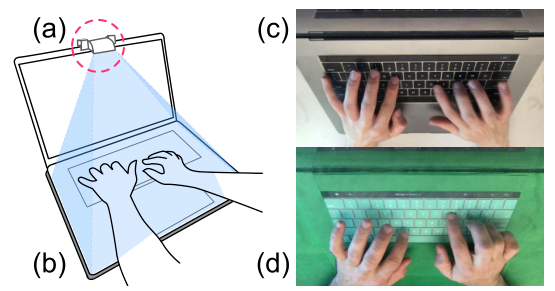
Earlier techniques recognize a hand posture at the moment a key is pressed, so the key press marks when to look. But touch typing already pairs each key press with automatic hand movements, and some postures are awkward to hold while pressing a key. Typealike drops the key press. A mirror reflector turns the built-in webcam down toward the keyboard, and a classifier labels every frame. So that ordinary typing is not mistaken for a command, the classifier also learns two non-posture classes: typing, and non-typing (clicking, resting, or no hands in view).
The posture set follows three design considerations from the paper:
- Recognition without a key press, so commands do not conflict with touch-typing motor behavior. Every posture uses a slightly extended thumb to look distinct from typing, touchpad use, and resting.
- Performed on or near the keyboard, with the wrist staying in contact with the laptop case. This keeps the move from typing to a command short, similar to the goal of minimizing homing time for pointing.
- Simple and easy to perform, so they are comfortable enough to be practical. Postures can be formed in a relaxed way, without forcibly clenching a fist or rigidly extending the thumb.
The posture set
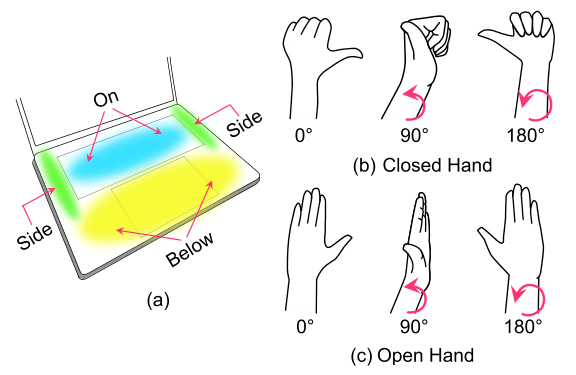
Each of the 36 postures is defined by four parameters:
- Hand: dominant or non-dominant.
- Form: a predominantly open or closed hand, thumb extended in both.
- Orientation: the palm touching the surface (0°), the side edge of the hand (90°), or the back of the hand (180°).
- Surface: on the central keyboard area, beside the keyboard (left or right, depending on the hand), or just below it. These are places where hands already rest while typing, resting, or using the touchpad.
Experiment 1: preferences and a dataset
Participants. 30 people (10 female, 20 male), aged 19 to 31 (mean 24.6), 23 of them right-handed, with a mean typing speed of 38 words per minute.
Apparatus. A 2018 15-inch MacBook Pro. The built-in camera, fitted with a mirror reflector, recorded the hands at 30 FPS in 1280×720. Twenty participants used a green keyboard and laptop cover, so the background could later be replaced through chromakeying. Lighting changed per block: diffuse ambient light in one block and a light source on the left or right side in the others.
Task. Short game-like trials, each up to 6 seconds: typing a five-letter word, pressing a shortcut (Shift, Ctrl, or Alt plus a letter), clicking a button with the touchpad, or holding a prompted posture. The posture prompt wiggled slightly, and participants mimicked it, which added variety to the images.
Design. Three blocks of 36 posture trials, each followed by a typing or clicking reference task: 216 trials per participant, about 25 minutes. At the end, participants rated every posture for comfort and overall preference on a 5-point scale.
Recognizer. We extracted frames from the last 2 seconds of each posture trial, plus typing and non-typing frames, for nearly 350K labeled images. A ResNet-50 network pre-trained on ImageNet was fine-tuned on 38 classes. For augmentation, we replaced the green background with random images and varied brightness by up to 20%. We tested with 10 random splits of 24 training and 6 validation participants, so the model was always evaluated on people it had never seen.
Experiment 2: postures versus shortcuts in real time
Participants. 20 new people (8 female, 12 male), aged 23 to 33 (mean 27.25), 14 right-handed and 6 left-handed, with a mean typing speed of 46 words per minute.
Apparatus. The same laptop and mirror, without the green cover and under normal room lighting. The recognizer ran at 30 FPS on the same laptop.
Task. The same tasks, but a posture trial ended as soon as the correct posture was recognized. Keyboard shortcuts served as a relative baseline.
Design. Five blocks, each with a sequence of 36 posture trials and a sequence of 36 shortcut trials, alternating with typing or clicking trials: 720 trials per participant. The first block was slower for postures, so we analyzed the last four.
Measures. Task completion time; Transition-In time, from the prompt to the first correct input; Transition-Out time, from the last input to the next prompt; and errors.
What do we learn?
1. Postures can be recognized without a key press
Across the 10 participant splits, the recognizer reached 97.4% accuracy (error rate 2.6%, sd 0.9%). Most confusions involved the typing and non-typing classes, and some automatically labeled frames turned out to be wrong, so a manual review of the labels could raise accuracy further. In real-time use, posture trial errors (no correct posture within 6 s) happened 6 times, and mode errors (the wrong posture) occurred in 4% of posture trials, compared with 3% for shortcuts.
2. Postures are faster to start, shortcuts are faster to leave
Postures took 1139 ms on average, versus 1738 ms for shortcuts. Postures had a 600 ms faster Transition-In time, but a 490 ms slower Transition-Out time. The gap was largest when returning to typing: 105 ms after a shortcut versus 1148 ms after a posture, which is no surprise since shortcuts are very close to typing.
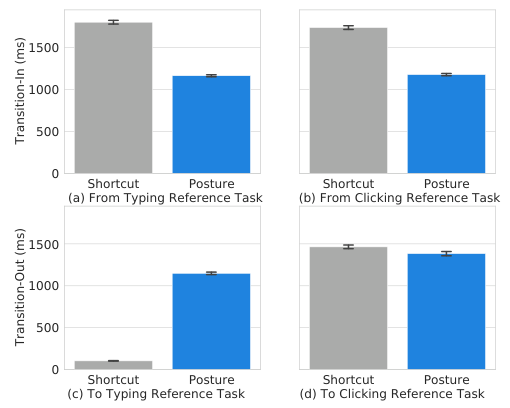
This comparison checks that postures fit alongside existing keyboard operations. It does not present postures as a replacement for shortcuts, which have a larger vocabulary and stay close to typing.
3. The 180° wrist turn is the least comfortable
Postures with a 180° wrist rotation were rated lowest for comfort (2.2, versus 3.7 for 90° and 3.8 for 0°) and for preference (2.3, versus 3.5 and 3.6). Postures below the keyboard were preferred over those beside it (3.4 versus 2.9). The most comfortable posture was the dominant open hand at 0° on the keyboard (4.36). The 90° postures were also the fastest to perform (1056.5 ms, versus 1189.5 ms at 0° and 1179 ms at 180°).

Design implications
- Avoid postures without wrist rotation during text entry. The 0° postures are closest to typing, so they can interfere with typing and confuse the recognizer.
- Save the 180° rotation for explicit, infrequent commands, such as locking the screen or closing all applications.
- Use local surfaces for in-situ commands. For example, select text with the touchpad, form a posture to copy, select a destination, and form a posture to paste, all without a key press.
- Use the non-dominant hand for quick commands. Non-dominant postures were slightly faster, so they could serve as a general mode switch.
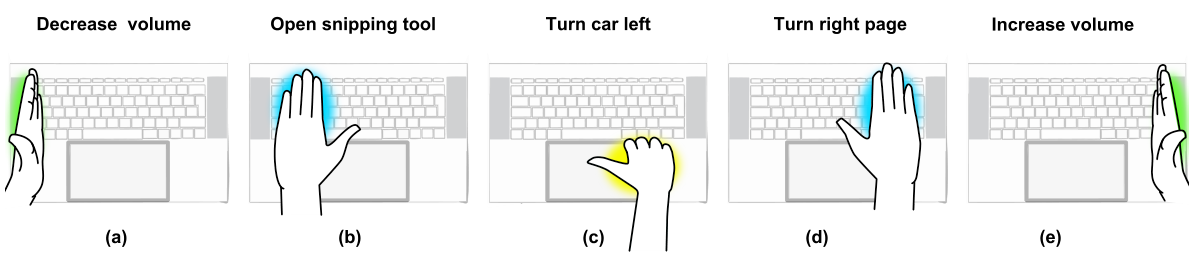
We demonstrated postures for system volume, page turning, switching to the eraser in a drawing application, opening a snipping tool, and controlling a racing game. We also tried two-handed postures, such as locking the screen with both hands closed at 180°.
Limitations
Our tasks balanced typing, clicking, shortcuts, and postures equally, while real tasks may mix them in different proportions. Shortcuts were prompted at random from a limited set, which may have added mental overhead, since real shortcut use benefits from repetition and motor memory. All sessions took place in a static indoor setting on the same device, and participants avoided tilting the screen in the first experiment. A real system would need more context to reject unintended postures. A real deployment could also replace the mirror with an ultra wide-angle lens, a pop-out mirror, or a rotating camera.
Media coverage
- University of Waterloo, Cheriton School of Computer Science: Computer scientists develop Typealike system to expand input on a keyboard
- ScienceDaily: System recognizes hand gestures to expand computer input on a keyboard
- New Atlas: Typealike tech uses computers’ existing webcams for gesture control
Publication
Nalin Chhibber, Hemant Surale, Fabrice Matulic, and Daniel Vogel. 2021. Typealike: Near-Keyboard Hand Postures for Expanded Laptop Interaction. Proceedings of the ACM on Human-Computer Interaction 5, ISS, Article 486 (November 2021), 20 pages. https://doi.org/10.1145/3486952
BibTeX
@article{chhibber2021typealike,
  title     = {Typealike: Near-Keyboard Hand Postures for Expanded Laptop Interaction},
  author    = {Chhibber, Nalin and Surale, Hemant Bhaskar and Matulic, Fabrice and Vogel, Daniel},
  journal   = {Proceedings of the ACM on Human-Computer Interaction},
  volume    = {5},
  number    = {ISS},
  articleno = {486},
  numpages  = {20},
  month     = nov,
  year      = {2021},
  publisher = {ACM},
  doi       = {10.1145/3486952}
}
Contact
Questions? Feel free to contact:
- Nalin Chhibber, School of Computer Science, University of Waterloo: nalin.chhibber [at] uwaterloo.ca
- Hemant Bhaskar Surale, School of Computer Science, University of Waterloo: hemant.surale [at] gmail.com
Figures are from the paper (© 2021 ACM) and are reproduced here by the authors.