What a mode switch costs, from touchscreens to VR
University of Waterloo · Supervisor: Daniel Vogel
PhD thesis · University of Waterloo, 2020
Quick facts
Most interfaces have modes: the same touch can draw, pan, or select, depending on the current mode. Mode-switching techniques had been compared experimentally for mice, pucks, and pens, but there was no comprehensive analysis for touch or for bare-hand mid-air input, so I measured them, then used the results to design an application that combines both. Overall, my thesis contributes:
- A comparison of touch mode-switching techniques: six techniques on a tablet, 36 participants, sitting and standing, with mode-switch time, error rates, and subjective ratings (Chapter 3).
- A comparison of bare-hand mid-air mode-switching techniques in VR: techniques selected from a review of prior work, compared in two experiments with an adapted subtraction-method protocol (Chapter 4).
- A design space for using a multi-touch tablet in VR: 11 design dimensions and an example interaction vocabulary that integrates touch and mid-air mode switching for 3D solid modelling (Chapter 5).
- A first step toward a theory of modes: a revised mode definition, a set of mode characteristics, and an experimental task and methodology to investigate them (Chapter 6).
Abstract
Raskin defines a mode as a distinct setting within an interface where the same user input will produce results different to those it would produce in other settings. Most interfaces have multiple modes in which input is mapped to different actions, and, mode-switching is simply the transition from one mode to another. In touch interfaces, the current mode can change how a single touch is interpreted: for example, it could draw a line, pan the canvas, select a shape, or enter a command. In Virtual Reality (VR), a hand gesture-based 3D modelling application may have different modes for object creation, selection, and transformation. Depending on the mode, the movement of the hand is interpreted differently. However, one of the crucial factors determining the effectiveness of an interface is user productivity. Mode-switching time of different input techniques, either in a touch interface or in a mid-air interface, affects user productivity. Moreover, when touch and mid-air interfaces like VR are combined, making informed decisions pertaining to the mode assignment gets even more complicated. This thesis provides an empirical investigation to characterize the mode switching phenomenon in barehand touch-based and mid-air interfaces. It explores the potential of using these input spaces together for a productivity application in VR. And, it concludes with a step towards defining and evaluating the multi-faceted mode concept, its characteristics and its utility, when designing user interfaces more generally.
The idea: measure the switch, then build with it
A mode error is familiar to anyone who has typed a password with CAPS LOCK on. Switching between modes can be frequent, so even small differences in how long a switch takes add up. The thesis has three steps: measure mode switching for touch and for mid-air input, combine the two input spaces in one VR application, and then step back to ask what a mode is.
Dillon et al. first used the subtraction method to time mode switching with a mouse, and Li et al. refined it for pens. Participants complete the same crossing or drawing task in baseline blocks (default mode only) and in compound blocks (alternating between modes). Subtracting the mean cycle time of the two adjacent baseline blocks from the compound cycle time isolates the time spent switching. For touch, this is the time between a touch-up and the next touch-down, when the hands are in the air. Because a switch involves going in and coming back out, errors are also split into mode-in and mode-out errors.
What’s inside
Chapter 1: Introduction. Modes, mode errors (from CAPS LOCK to aviation accidents), the definitions of a mode I build on (MacKenzie and Raskin), and the research questions.
Chapter 2: Background. Prior mode-switching studies for mouse and pen, touch and mid-air techniques that had not been compared formally, the subtraction method, and earlier uses of tablets, tabletops, and props in mixed reality.
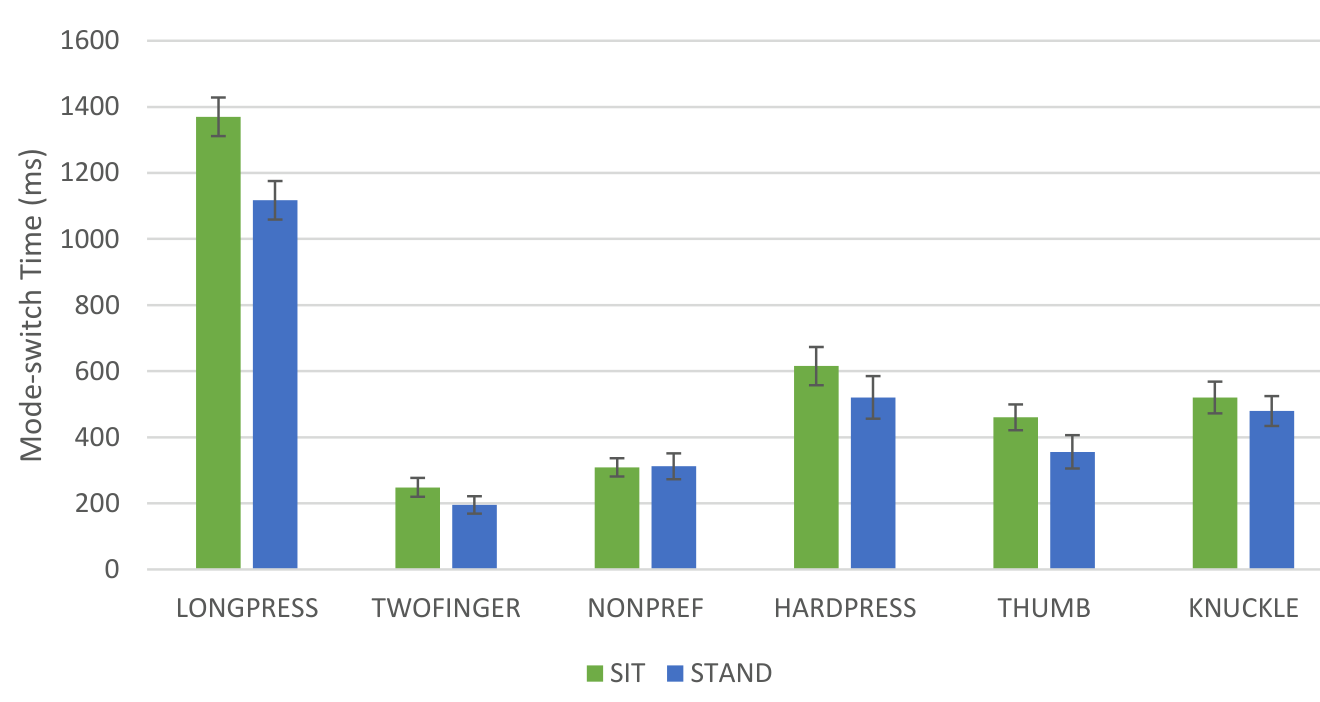
Chapter 3: Touch-based mode switching (CHI ‘17 paper, with Fabrice Matulic and Daniel Vogel). I compared six techniques: long press, two-finger touch, a non-preferred-hand button, hard press, thumb-on-finger, and knuckle. Thumb-on-finger and knuckle were sensed with extra hardware to simulate future sensors. 36 participants did the task either seated with the tablet on a desk or standing with the tablet on the forearm. The task, crossing five oriented rectangles while alternating between modes, is a near-replication of Li et al.’s pen study, so the results can be compared with pen.
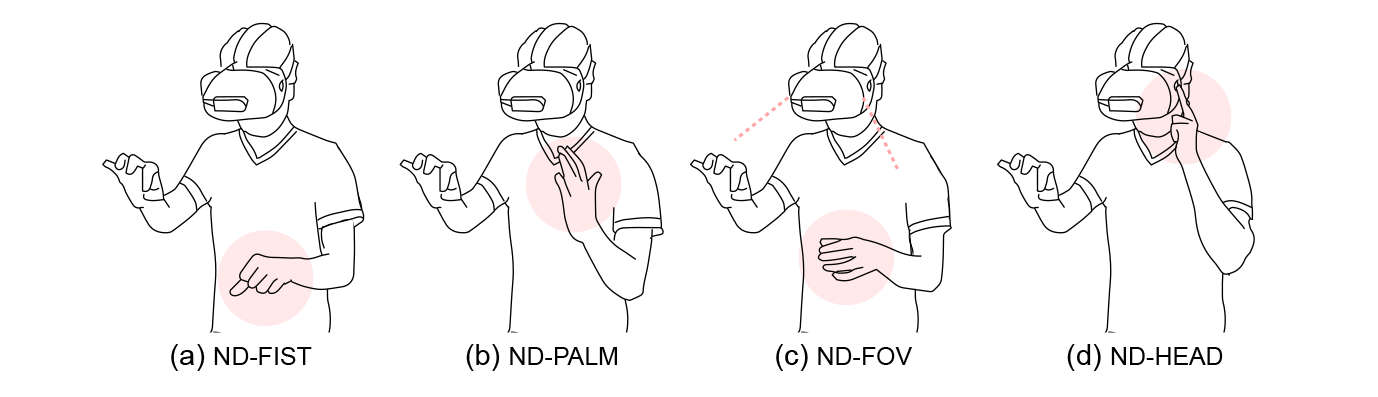
Chapter 4: Bare-hand mid-air mode switching in VR (CHI ‘19 paper, with Fabrice Matulic and Daniel Vogel). I grouped bare-hand mid-air actions from prior research and commercial systems into classes and picked representative ones. Experiment 1 (16 participants) compared seven bare-hand techniques for the dominant and non-dominant hand, plus a controller button held in the non-dominant hand, while the dominant hand drew lines with a pinch. Experiment 2 (12 participants) tested two subtler dominant-hand pinches (an oriented pinch and a middle-finger pinch) and checked whether a pinch works as well as a controller button as the drawing trigger.
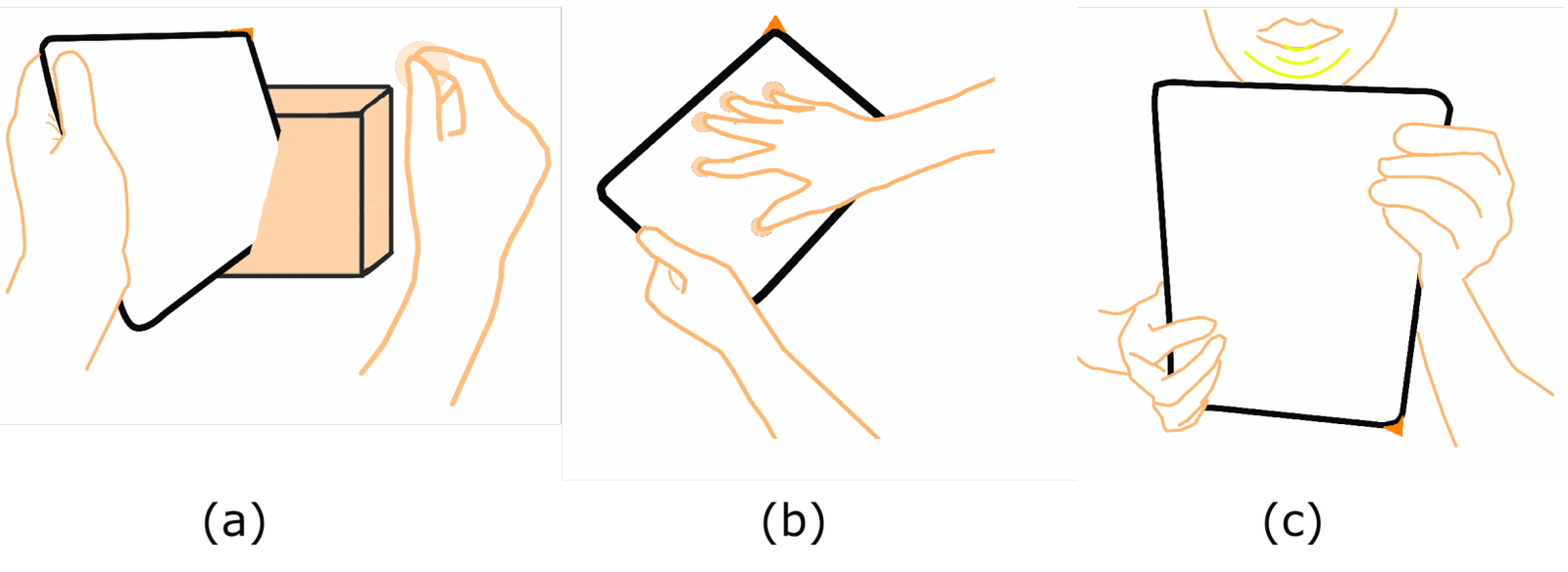
Chapter 5: Combining touch and mid-air input (CHI ‘19 paper, with Aakar Gupta, Mark Hancock, and Daniel Vogel). A formative study with 10 participants asked how people would use a physical tablet in VR for 3D modelling. From 7 observations I defined 11 design dimensions (for example unimanual vs. bimanual, direct vs. indirect, physical vs. non-physical) and built an example vocabulary: two-finger drag to translate, five-finger drag to navigate, swipe-in to delete, tablet orientation to choose a transformation axis, and the tablet as a knife to slice objects. Six participants used the prototype to replicate a target model and to build their own.
Chapter 6: Mode theory. The earlier chapters treat mode switching in isolation, but switching is only one characteristic of a mode. I built three abstract interfaces modelled on document editors (one canvas with buttons), web browsers (overlapping canvases with tabs), and code editors (multiple canvases as tiles), each with five ink colours as modes, plus an un-moded baseline. 12 participants on Amazon Mechanical Turk did a line-crossing task. From this and the literature I describe mode characteristics (mode switching, occupancy, frequency, pattern, errors, scaling, and chunking and phrasing) and propose a revised definition: “a user interface mode is an elastic psychomotor ability to progressively acquire a skill.”
Chapter 7: Conclusion. Future directions: switching between arbitrary modes instead of a fixed baseline (compound modes), other modalities and devices, more complex tasks such as active reading, and modes in aviation psychology.
Key findings
1. On touch, two fingers is fastest and long press is far slower
From fastest to slowest: two-finger (222 ms), non-preferred-hand button (311 ms), thumb-on-finger (408 ms), knuckle and hard press (500 and 568 ms, not significantly different), and long press (1244 ms), which was more than five times slower than two-finger. Sitting or standing had no significant effect on switch time. Hard press was rated the least accurate, one of the most fatiguing, and the hardest to learn. Touch switching was generally slower than Li et al.’s pen results: their non-preferred-hand and pressure times (139 and 284 ms) are roughly half of mine.
2. In VR, the non-dominant hand is faster and more accurate, unless the dominant-hand action is subtle
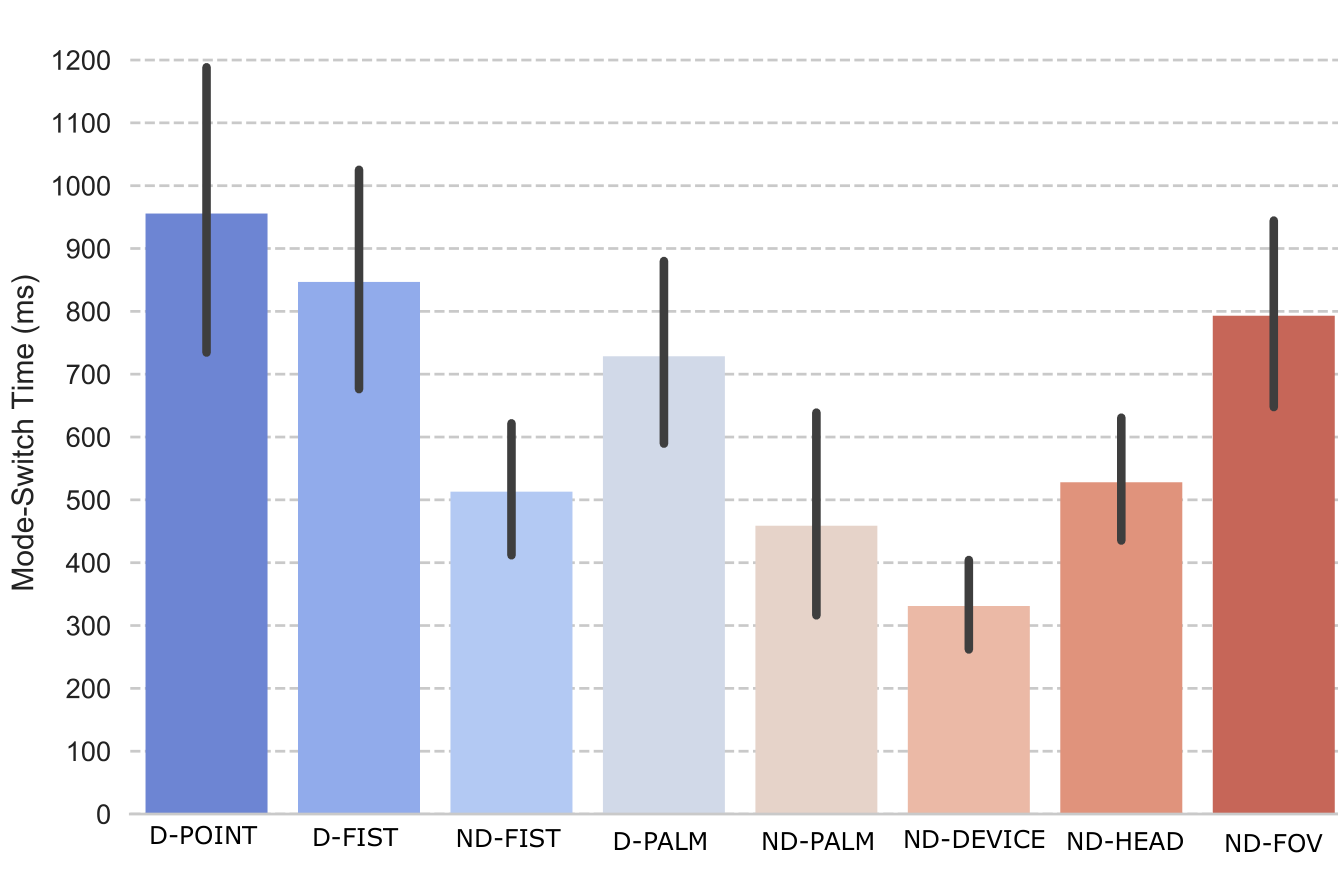
In Experiment 1, the order was: controller button in the non-dominant hand (331 ms), non-dominant palm (459 ms), non-dominant fist (513 ms), touching the head (528 ms), dominant palm (729 ms), non-dominant hand in the field of view (793 ms), dominant fist (846 ms), and dominant pointing (955 ms). Error rates ranged from 5.3% (controller) to 18.3% (dominant pointing), with dominant-hand postures the most error prone. In Experiment 2, the middle-finger pinch (233 ms) was not significantly different from the controller (226 ms), while the oriented pinch took 669 ms.
3. A pinch is a practical stand-in for a controller button
When the non-dominant mode-switching action was held constant, switch times with a pinch trigger and with a controller trigger were not significantly different. Baseline drawing was significantly faster with a pinch, but only by about 41 ms. Most mid-air switch times were comparable to most touch techniques.
4. Tablet and hands work together for 3D modelling, and interface layout changes mode errors
All six participants replicated the target model in the TabletInVR prototype, and in free exploration they built models such as a chair, a tree, and houses. Navigation and menus on the back of the tablet were the hardest parts. In the mode-theory pilot, the multiple-canvas layout had the fewest mode errors (below 1%) but the slowest responses (638 ms), the overlapping-canvas layout the most mode errors (6.6%) at 471 ms, and the single canvas 4.8% at 529 ms. The differences in mode errors were not statistically significant.
Design implications
- Touch, with current devices: use two-finger touch when accuracy is not critical and a non-preferred-hand button otherwise. Thumb-on-finger is a good choice once sensors support it. Avoid long press in most cases, and be careful with pressure.
- An example touch mapping: one finger to draw, two fingers to pan, thumb-on-finger to select, and a knuckle to open a command menu.
- VR, for accuracy-focused tasks: use non-dominant actions such as raising a palm or touching the head. If the dominant hand must switch modes, use a subtle variation of the selection pinch, such as the middle-finger pinch.
- Avoid the pointing posture for frequent mode switching. It was the slowest technique and caused the most errors, even though it is a common mid-air action.
- Combining touch and mid-air input: the design dimensions can work around current limits, for example by using indirect input on the tablet screen when 3D tracking of the tablet is unreliable.
Limitations
The touch and mid-air studies used a single mode switch at a high, regular frequency in a synthetic task, always switching to and from a common baseline. Some techniques relied on extra sensors, and results could change with other sensing. The TabletInVR evaluation was qualitative, with six participants (all male). The mode-theory study is a pilot with 12 online participants, and its results might change with a wider participant pool.
Publication
Hemant Surale. 2020. Barehand Mode Switching in Touch and Mid-Air Interfaces. PhD thesis. University of Waterloo, Waterloo, Ontario, Canada. https://uwspace.uwaterloo.ca/handle/10012/15950
BibTeX
@phdthesis{surale2020barehand,
  title   = {Barehand Mode Switching in Touch and Mid-Air Interfaces},
  author  = {Surale, Hemant},
  school  = {University of Waterloo},
  address = {Waterloo, Ontario, Canada},
  year    = {2020},
  url     = {https://uwspace.uwaterloo.ca/handle/10012/15950}
}
Contact
Questions? Feel free to contact:
- Hemant Bhaskar Surale, University of Waterloo: hemant.surale [at] gmail.com
Figures are from the thesis (© 2020 Hemant Surale) and are reproduced here by the author. Chapters 3 to 5 include material published by ACM.