Moving work across devices, apps, people, and time
1Microsoft Research, Redmond · 2University College London · 3University of Calgary · 4ETH Zürich · 5Georgia Institute of Technology · 6University of Waterloo · 7Ohio State University · 8Cornell University
†The first two authors contributed equally.
Conference paper · UIST '20: ACM Symposium on User Interface Software and Technology, Virtual Event, USA
Quick facts
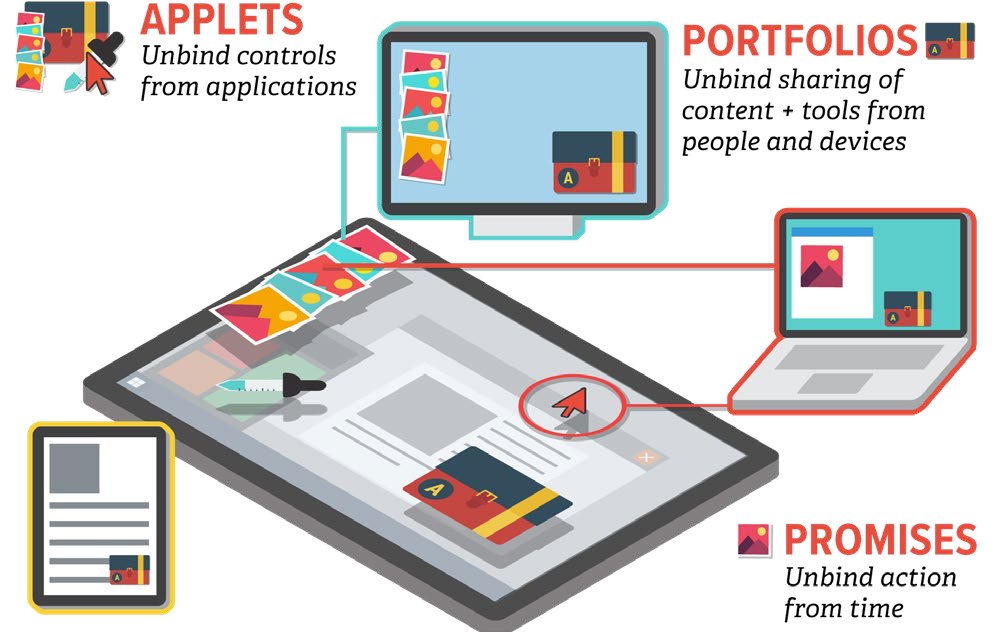
The things we work with, such as a clipboard, a color picker, or a photo we still need, are usually tied to one device, one app, one person, and the present moment. SurfaceFleet, led by Frederik Brudy (University College London) and David Ledo (University of Calgary) at Microsoft Research, is a working Windows system that loosens all four ties at once. Overall, our work contributes:
- A framing of mobility as transitions in “place” along four cornerstones of unboundedness: device, application, user, and time.
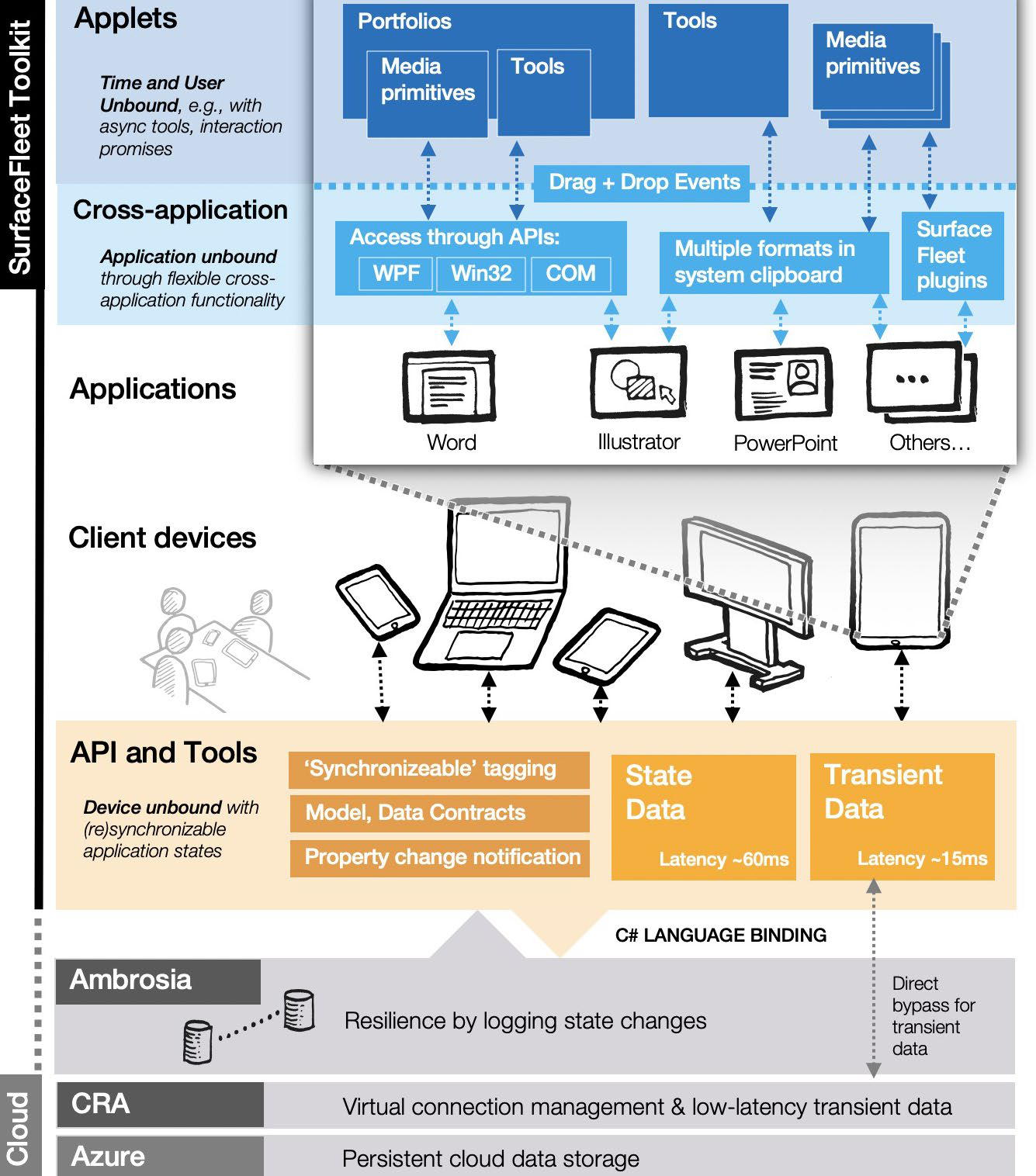
- The SurfaceFleet system, built on a resilient distributed-systems foundation (Ambrosia) that logs every change to shared state, so moving to another device becomes a cross-device fail-over.
- A preliminary toolkit for writing SurfaceFleet applications in C# without deep prior expertise in distributed systems.
- Interaction techniques, explored as technology probes: Applets, Portfolios, Interaction Promises, Tools, Media Primitives, and Containers.
Abstract
Knowledge work increasingly spans multiple computing surfaces. Yet in status quo user experiences, content as well as tools, behaviors, and workflows are largely bound to the current device: running the current application, for the current user, and at the current moment in time. SurfaceFleet is a system and toolkit that uses resilient distributed programming techniques to explore cross-device interactions that are unbounded in these four dimensions of device, application, user, and time. As a reference implementation, we describe an interface built using Surface Fleet that employs lightweight, semi-transparent UI elements known as Applets. Applets appear always-on-top of the operating system, application windows, and (conceptually) above the device itself. But all connections and synchronized data are virtualized and made resilient through the cloud. For example, a sharing Applet known as a Portfolio allows a user to drag and drop unbound Interaction Promises into a document. Such promises can then be fulfilled with content asynchronously, at a later time (or multiple times), from another device, and by the same or a different user.
The idea: unbind the action, not just the file
Services like Dropbox, OneDrive, and Google Drive synchronize whole files and folders, and Slack and Teams share inside their own app. SurfaceFleet works at a finer grain: single pieces of content, tools, and inputs. Every change to shared state is written to a durable, replayable log in the cloud, so any device in a group (a federation) can catch up by replaying it, right away or later. That one mechanism lets a single drag and drop cross all four boundaries.
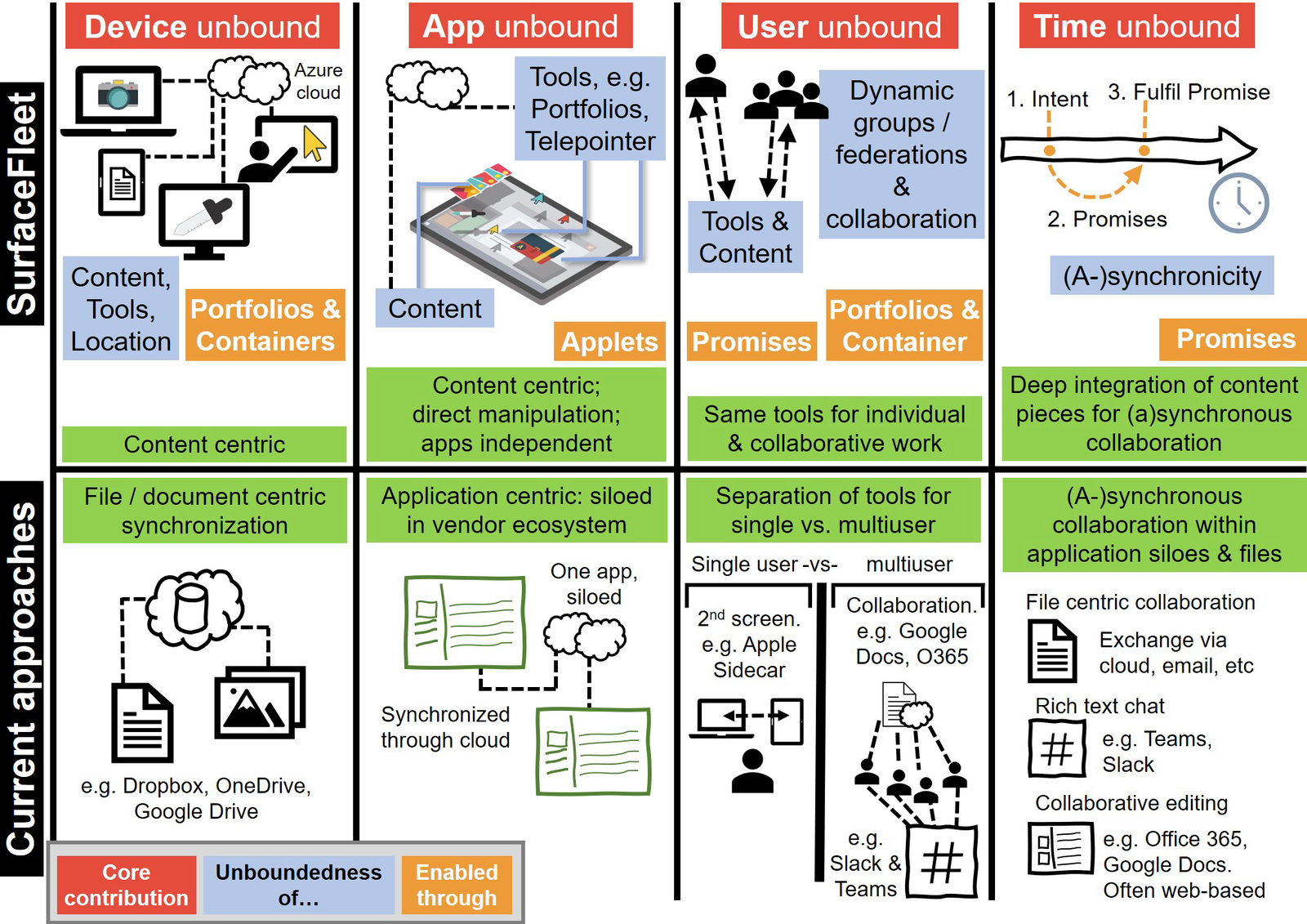
Each of the four cornerstones maps to one part of the design:
- Device: each client keeps a local copy of shared state, and a device that joins replays the log. Moving activity to another machine is a special case of fail-over.
- Application: Applets are independent programs that float above the window manager. They reach unmodified programs through drag and drop, the system clipboard, and COM plugins, rather than living inside a browser or one sharing app.
- User: the Portfolio that carries your own work between devices also passes it to a collaborator. Individual tools are collaborative tools, and vice versa.
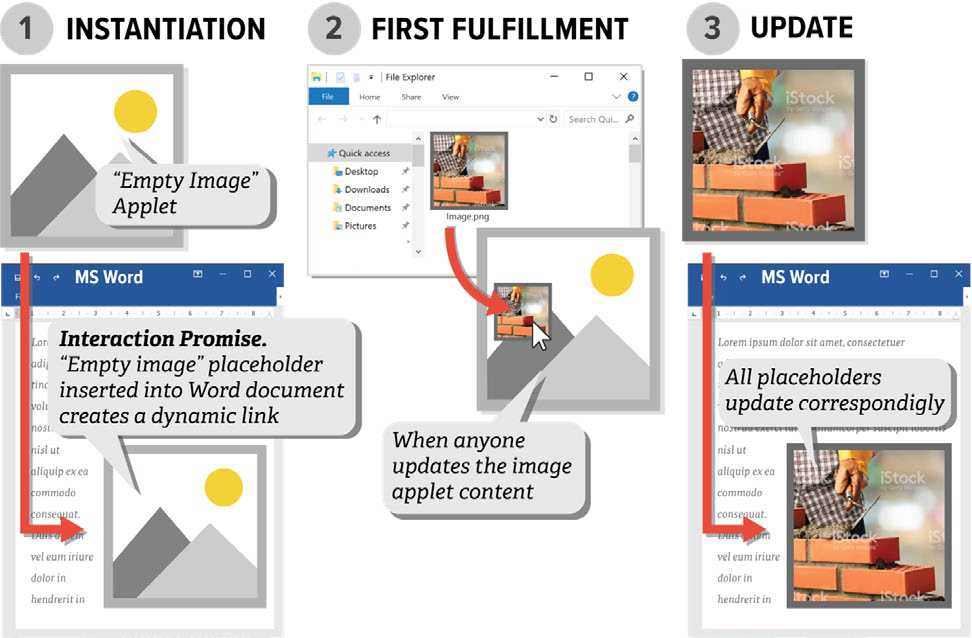
- Time: an Interaction Promise is a placeholder for content that does not exist yet. It can be fulfilled later, and more than once.
System and toolkit
Platform. SurfaceFleet runs on Windows and is written in C# with the .NET Framework and Windows Presentation Foundation (WPF).
Shared state. We built a custom infrastructure on top of Ambrosia, an open-source system that captures state changes in a deterministically replayable log, persisted through Azure. Ambrosia uses CRA, which virtualizes connections between devices, so the system is robust to IP address changes. Clients in a federation reach the shared state through a federation-specific connection string.
Programming model. Developers tag a property as [Synchronizable] and subscribe to ModelUpdated events for remote changes. They write no extra logic for distributed failure cases. The toolkit handles basic types, images, colors, lists, and dictionaries, and developers can add their own classes with a C# DataContract.
Working with existing apps. Dragging an image Applet puts three formats on the drag: a file path to a copy of the image, a bitmap in several formats for unmodified programs, and an internal ID for SurfaceFleet components. Plugins use COM to integrate with Word, Illustrator, Photoshop, and PowerPoint. In Word, a Promise is an invisible bookmark with a unique ID around a placeholder image; on fulfillment, SurfaceFleet finds the ID and replaces the content.
Trust. Clients must run an organizationally approved operating system image. Windows device attestation through the CPU’s Trusted Platform Module (TPM) checks this before a device receives the key to a federation’s shared state.
Interaction techniques
SurfaceFleet has five mechanisms that users combine to unbind content and tools:
- Portfolios: like an art portfolio case, a shared portal for content and tools. A Portfolio wiggles when something is dragged over it, shows its contents sticking out on every device that has access, and gives an item back as a floating Applet on a double-tap.
- Interaction Promises: placeholders for content that is not available yet. All placeholders linked to the same Applet update when it changes, locally, on another device, or by another user. A Promise can also return a Container with several options to choose from.
- Tools: Applets for generic commands, such as a Color Picker that samples a pixel from any device, a Camera tool, Tele-point and Tele-type for passing your mouse or keyboard to another device, Screen Grab, Extract (a snapshot of the visible page), and a Clipboard tool.
- Media Primitives: single pieces of content (images, rich text, or colors) lifted into floating Applets that can be dropped into Word, Illustrator, PowerPoint, Photoshop, File Explorer, or other Applets.
- Containers: a fanned-out sheaf of items that works as a multi-object visual clipboard. Linked to the Clipboard tool and shared through a Portfolio, it becomes a distributed clipboard.
What do we learn?
The paper presents design probes rather than a controlled study. The lessons below come from building and using the system ourselves and from preliminary pilot feedback.
1. A few concepts combine into many workflows
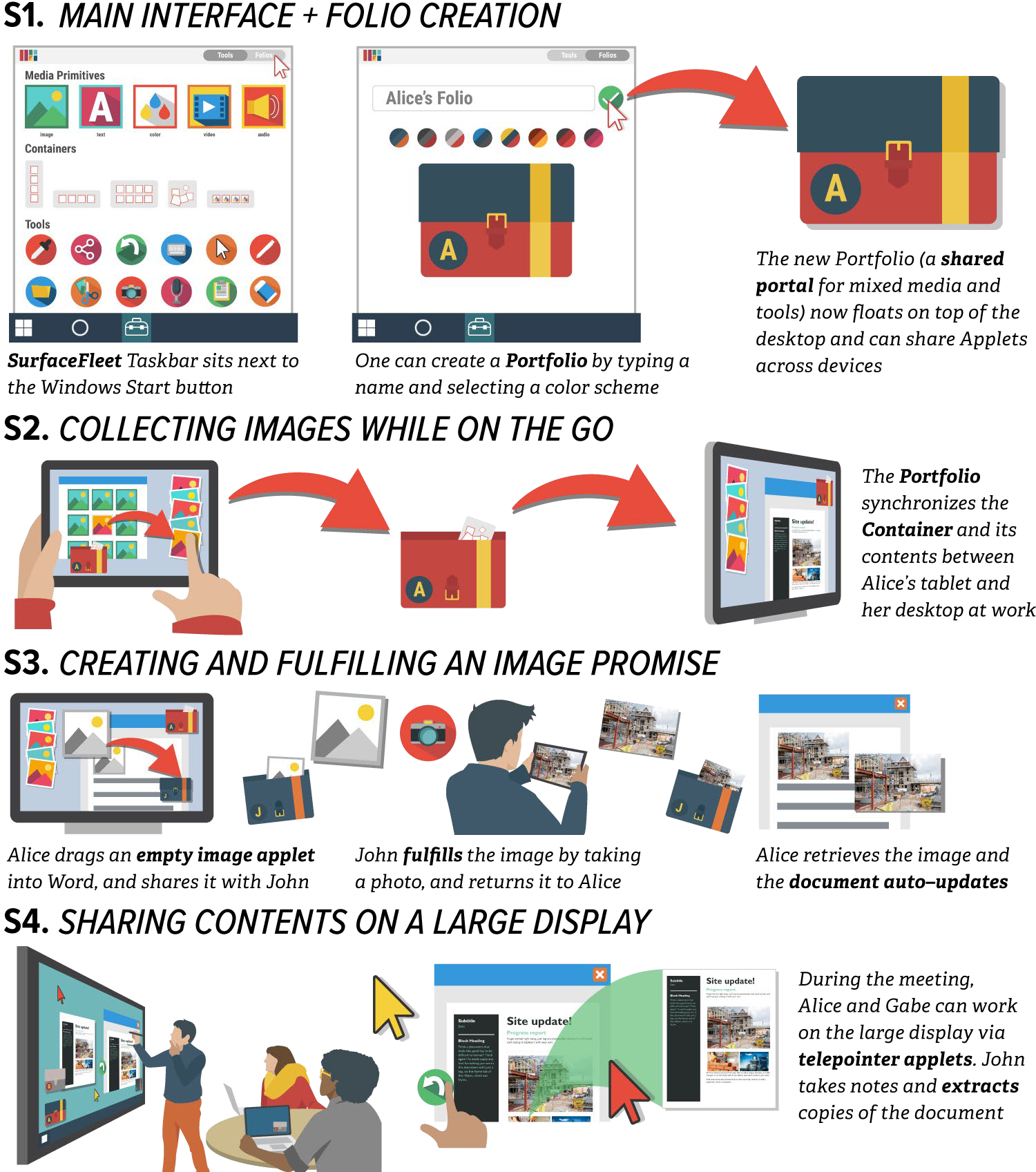
In our usage scenario, an architect named Alice creates a Portfolio, collects site photos into a Container on her tablet on the train and opens them on her office desktop, inserts a placeholder that her on-site co-worker John fills with a photo, and, in a meeting, works with two colleagues who pass their mouse pointers to a large display. All four steps reuse the same five mechanisms. Because sharing is split into small Applets and Tools rather than whole files, people can share parts of documents and other intermediate work.
2. Current tools each cover only part of the problem
Each kind of unbinding has precedents, but existing services handle them separately: file and folder sync (Dropbox, OneDrive, Google Drive), messaging silos (Slack, Teams), second screens and handoff (Apple Continuity), and collaborative editing inside one app (Office 365, Google Docs). SurfaceFleet is the first distributed system to address all four cornerstones simultaneously, for both tools and pieces of content, with only a few toolkit abstractions and interactions.
3. The current design suits small, active work
The interface is meant for transient work-objects in active use, not the long tail of items in cold storage: a single active project rather than an archive, small groups rather than large meetings, and semi-private sharing among trusted peers rather than open participation. Leaving Applets around like papers on a messy desk might not scale to hundreds of them. These choices belong to the current probes, not to the four cornerstones, the distributed-systems foundation, or the toolkit.
Limitations
- No formal evaluation. We make no strong claims that SurfaceFleet makes distributed work “better”, and it is not yet developed enough to deploy for real work or longitudinal studies.
- Feedback and awareness. The interface does not show which devices or users a Portfolio is shared with, or who is connected. We rely on social protocol, which leaves room for dragging something private into the wrong Applet.
- No device discovery. The system does not sense nearby devices or services to form federations automatically.
- Packaging. The technical foundation has many layers that would need better packaging to be usable and maintainable, and the system runs on Windows only. At the time, we were investigating distributed interactions for JavaScript and Android through Ambrosia and CRA.
Publication
Frederik Brudy, David Ledo, Michel Pahud, Nathalie Henry Riche, Christian Holz, Anandghan Waghmare, Hemant Bhaskar Surale, Marcus Peinado, Xiaokuan Zhang, Shannon Joyner, Badrish Chandramouli, Umar Farooq Minhas, Jonathan Goldstein, William Buxton, and Ken Hinckley. 2020. SurfaceFleet: Exploring Distributed Interactions Unbounded from Device, Application, User, and Time. In Proceedings of the 33rd Annual ACM Symposium on User Interface Software and Technology (UIST ‘20), Virtual Event, USA. ACM, 7-21. https://doi.org/10.1145/3379337.3415874
BibTeX
@inproceedings{brudy2020surfacefleet,
  title     = {SurfaceFleet: Exploring Distributed Interactions Unbounded from Device, Application, User, and Time},
  author    = {Brudy, Frederik and Ledo, David and Pahud, Michel and Henry Riche, Nathalie and Holz, Christian and Waghmare, Anandghan and Surale, Hemant Bhaskar and Peinado, Marcus and Zhang, Xiaokuan and Joyner, Shannon and Chandramouli, Badrish and Minhas, Umar Farooq and Goldstein, Jonathan and Buxton, William and Hinckley, Ken},
  booktitle = {Proceedings of the 33rd Annual ACM Symposium on User Interface Software and Technology},
  series    = {UIST '20},
  location  = {Virtual Event, USA},
  pages     = {7--21},
  year      = {2020},
  publisher = {ACM},
  doi       = {10.1145/3379337.3415874}
}
Contact
Questions? Feel free to contact:
- Frederik Brudy, Microsoft Research and University College London: f.brudy [at] cs.ucl.ac.uk
- David Ledo, Microsoft Research and University of Calgary: david.ledo [at] ucalgary.ca
- Hemant Bhaskar Surale, Microsoft Research and University of Waterloo: hemant.surale [at] gmail.com
Figures are from the paper (© 2020 ACM) and are reproduced here by the authors.