Two fingers beat a long press
1Cheriton School of Computer Science, University of Waterloo
Conference paper · CHI '17: ACM Conference on Human Factors in Computing Systems, Denver, CO, USA
Quick facts
Touch interfaces need modes: the same finger stroke might draw, pan, select, or open a menu. We compared six ways of switching modes on a tablet, with 36 participants seated or standing, using the protocol of a widely cited pen study so that touch and pen can be compared directly. Overall, our work contributes:
- A ranking of techniques, fastest to slowest: two fingers, a non-preferred hand button, thumb-on-finger, knuckle or hard press, and a much slower long press.
- Pose barely matters. Sitting or standing had no effect on speed and little or no effect on errors (only hard press and the non-preferred hand showed some interaction with pose).
- Hard press is the least liked. It was perceived as the least accurate, one of the most fatiguing, and the hardest to learn.
- Touch versus pen. Our touch mode-switching times and error rates are higher than those reported for pen (except knuckle compared to the pen eraser).
- A design example: one finger could draw, two fingers pan, thumb-on-finger select, and knuckle open a command menu.
We later ran the same kind of study with bare hands in mid-air: see our VR mode-switching paper.
Abstract
This paper presents the results of a 36 participant empirical comparison of touch mode-switching. Six techniques are evaluated, spanning current and future techniques: long press, non-dominant hand, two-fingers, hard press, knuckle, and thumb-on-finger. Two poses are controlled for: seated with the tablet on a desk and standing with the tablet held on the forearm. Findings indicate pose has no effect on mode switching time and little effect on error rate; using two-fingers is fastest while long press is much slower; non-preferred hand and thumb-on-finger also rate highly in subjective scores. The experiment protocol is based on Li et al.’s pen mode-switching study, enabling a comparison of touch and pen mode switching. Among the common techniques, the non-dominant hand is faster than pressure with touch, whereas no significant difference had been found for pen. Our work addresses the lack of empirical evidence comparing touch mode-switching techniques and provides guidance to practitioners when choosing techniques and to researchers when designing new mode-switching methods.
The idea: measure only the switch
A mode switch is buried inside an ordinary stroke: you move to the target, switch, touch, drag, and lift. To isolate it, we used the “subtraction method”. Each task is split into cycles of two crossings. In the compound task a full cycle contains one moded crossing and one default crossing, while in the baseline task both crossings are default. The difference between the two mean cycle times is the mode-switch time.
The second diagram explains why techniques differ. The non-preferred hand button, thumb-on-finger, and knuckle must be engaged before the finger touches the screen, so they add preparation time in the air (about 164, 179, and 223 ms). Two fingers and hard press engage after touch down, and quickly (26 and 45 ms). Long press has to wait out its 500 ms timer, and people then took another 238 ms to respond to the feedback.
Experiment
Techniques. Six techniques spanning current and near-future touch input:
- Long press: hold still for 500 ms (the Android default) within a 3 mm radius.
- Two fingers: two touches detected before the stroke enters the target, with the input point at their midpoint.
- Non-preferred hand: press and hold a 45 × 25 mm on-screen button with the other hand before touching down.
- Hard press: press hard enough to cross a per-user threshold.
- Thumb-on-finger: press the thumb against the side of the index finger before touching down, like a pen’s barrel button.
- Knuckle: turn the hand over and touch with a knuckle, like flipping a pen to its eraser.
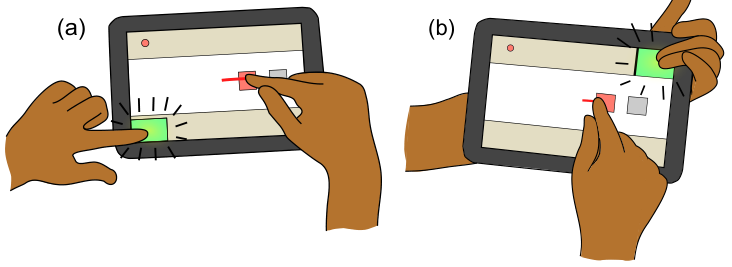
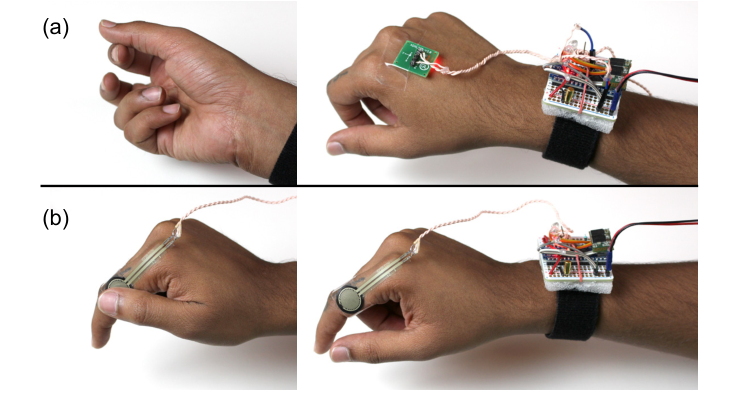
Apparatus. A Google Nexus 10 tablet (2560 × 1600 px, 300 PPI) with 100 ms end-to-end latency. Hard press, knuckle, and thumb-on-finger are not sensed natively by current tablets, so we simulated future sensors. Hard press used a MYO EMG armband with a per-user classifier (almost 99% accurate in a 5-person pilot). Knuckle used an accelerometer on the back of the hand, and thumb-on-finger used a force-sensitive resistor taped to the index finger.
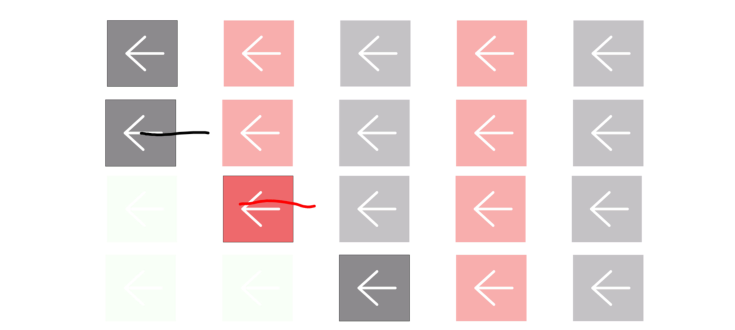
Task. Cross five 20 × 22 mm targets in a row in one of four directions. In the baseline task all five are grey and crossed with normal touch. In the compound task they alternate grey and red, and red targets must be crossed with the mode engaged (the trail turns red). Any error triggers a beep and the target must be crossed again.
Participants. 36 people (8 women, all right-handed, mean age 24.1). Half sat with the tablet flat on a table, and half stood holding it on the non-dominant forearm.
Measures. Mode-switch time (subtraction method), crossing time, and error rates: crossing errors, out-of-target errors, and mode errors split into mode-in and mode-out. Each participant made 1,080 crossings, then rated each technique.
What do we learn?
1. Two fingers is fastest, long press is far slower
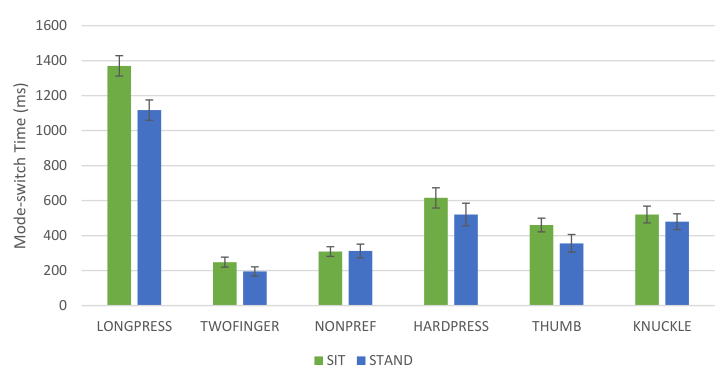
Mean mode-switch times: two fingers 222 ms, non-preferred hand 311 ms, thumb-on-finger 408 ms, knuckle 500 ms and hard press 568 ms (not significantly different from each other), and long press 1,244 ms. All other pairs were significantly different. Long press was more than twice as slow as the next slowest technique and more than five times slower than two fingers.
2. Sitting or standing barely matters, except for hard press and the other hand
Pose had no significant effect on mode-switch time. For errors, there was no significant difference between techniques when sitting (4.8% to 7.5% combined error). Standing, hard press (13.5%) and the non-preferred hand (10.8%) stood out, while the rest ranged from 3.3% to 7.1%. This suggests both are harder to perform when standing. Two participants with small hands sometimes had trouble reaching the button across the bezel with the hand holding the tablet.
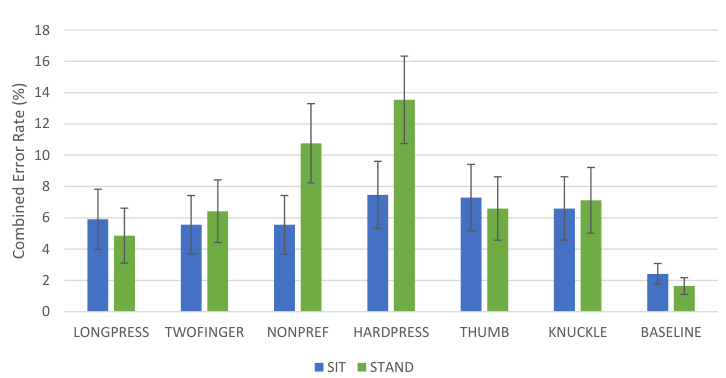
3. When accuracy matters, use thumb-on-finger; avoid pressure
Thumb-on-finger had the lowest out-of-target error rate (1.0%, against 5.9% for two fingers), and lower crossing errors than the non-preferred hand (1.5% vs. 3.9%). Hard press was rated the least accurate technique and harder to learn than long press and two fingers, and hard press and knuckle were rated more tiring and harder to use than the rest. One participant said it almost felt like breaking the tablet. Knuckle surprised us: despite the occlusion, its error rate was comparable to the best techniques, although people found it tiring.
4. Touch is not pen
Following Li et al.’s pen study let us compare directly. Our touch times were systematically higher: Li et al. report 139 ms for the non-preferred hand and 284 ms for pen pressure, roughly half of our values. With touch, the non-preferred hand was faster than pressure, whereas no significant difference had been found for pen. One possible reason: Li et al.’s participants could rest a finger on a physical button, while ours had to target an on-screen button.
Design implications
- With current devices, use two fingers when accuracy is not critical, and a non-preferred hand button when it is.
- With future sensors, thumb-on-finger is a good choice. Knuckle works surprisingly well, though many people find it inaccurate and uncomfortable.
- Avoid long press in most cases, and be cautious with pressure for touch mode switching.
- Possible improvements: show a cursor between two fingers before touch (with pre-touch sensing), allow the mode to be engaged shortly after touch down to reduce mode-in errors, and combine techniques, such as two fingers or knuckle together with the non-preferred hand, to support several modes.
Limitations
Like Li et al., we used a synthetic, linear task with a single mode switched at a high and regular frequency. This allows fine-grained analysis, but results should be validated in more realistic tasks and with more than two modes. Knuckle, hard press, and thumb-on-finger required participants to wear extra sensors, and results could change with other sensing. The non-preferred hand button had a fixed size and position, and the 500 ms long press duration could be further optimized.
Publication
Hemant Bhaskar Surale, Fabrice Matulic, and Daniel Vogel. 2017. Experimental Analysis of Mode Switching Techniques in Touch-based User Interfaces. In Proceedings of the 2017 CHI Conference on Human Factors in Computing Systems (CHI ‘17), Denver, CO, USA. ACM, 3267-3280. https://doi.org/10.1145/3025453.3025865
BibTeX
@inproceedings{surale2017experimental,
  title     = {Experimental Analysis of Mode Switching Techniques in Touch-based User Interfaces},
  author    = {Surale, Hemant Bhaskar and Matulic, Fabrice and Vogel, Daniel},
  booktitle = {Proceedings of the 2017 CHI Conference on Human Factors in Computing Systems},
  series    = {CHI '17},
  location  = {Denver, Colorado, USA},
  pages     = {3267--3280},
  year      = {2017},
  publisher = {ACM},
  doi       = {10.1145/3025453.3025865}
}
Contact
Questions? Feel free to contact:
- Hemant Bhaskar Surale, University of Waterloo: hemant.surale [at] gmail.com
Figures are from the paper (© 2017 ACM) and are reproduced here by the authors.